Jul 24, 2011

what rights needed to view sharepoint sites associated with TFS Team Projects

Given the scenario that you have TFS integrated with SharePoint and Report Server, each TFS team site can have an associated SharePoint site which display info such as reports and Team projects work items. To view this sharepoint site, what rights need to be granted:
  • sharepoint permission
  • TFS team project readers right (via TFS Administration Console)
  • Report Server "Browser" right (via Report Manager site)
One of very confusing service account required for TFS is Report Reader Account. The MSFT document says :
The report reader account is the identity that is used to gather information for reports
It has nothing to do with Report Server access, it is the account that will be granted access to one of database called TFS_WareHouse. So it is the identity utilized to retrieve data for reports, not access reports themselves.

Jun 16, 2011

Redesign an infopath template from sharepoint site

If you publish an infopath template directly to a sharepoint library, you can design (redesign) it later with InfoPath client, but what if you publish the template as a content type or as administrator approved form? you will NOT be able to do the same thing as direct publish by browsing sharepoint library.

Instead, go to Site Settings->Site Content Type Gallery ->select content type->Advanced Settings -> Edit Template:


access denied error with SPD workflow

Lately running into a problem when any user with "designer" permission level failed to save workflow from SPD with an error saying " Server Error: Access Deny". Further, users with designer permission can't manually start this workflow from browser with a similar access deny error. The workflow startup page is one of four files listed for each workflow in SPD, and it is missing from designer view:


Check out and check this file back in, the error goes away.

May 27, 2011

Implement AJAX & Backend Services

Way to implement Ajax:
  • use Sys.Net.WebRequest to call backend service (ASPX, ASMX or ASHX)
  •  server side ajax enabled WCF service
    • use asp:servicereference to emit script proxy for client script to call WCF service
  • client side Ajax Library:  http://microsoftpdc.com/Sessions/FT29
  • Ajax Toolkit (server side Ajax controls)


What backend services to call?


WCF or ASMX?
  • WCF/REST: Async friendly, abstract complexity (serialization/deserialization etc) web friendly, Binary, format of choice (Json/xml/image etc.), end to end
  • Session Http cookies
  • SOAP based web service asmx: overhead, xml only, computing distribution

May 20, 2011

configure ASP.NET impersonation authentication in IIS 7 and forward user credentials

If you just add  in  web.config aiming to configure impersonation for a IIS 7 web site, the site will be broken immediately with a HTTP 500 error.

The reason is that Application Pools in IIS 7  have  "Managed Pipeline Mode" defaulted as "Integrated", under which impersonation doesn't work. Changing from "Integrated" to "Classic" is the fix. If you check all application pools for sharepoint application, they are all set as "Classic".

Since IIS 7 use Kernel Mode for authentication, and if you are using server BIOS name as URL, you get Kerberos authentication for free (see this blog for details). Does this mean, with impersonation in place,  you can forward logon user's credential to next hop? for example, setting credential before calling web service such as:

svc.Credentials = System.Net.CredentialCache.DefaultCredentials; 
 
You still need delegation right for your service account (or machine account?) to make that hop happen. Otherwise you simply forward a empty credential to the web service, and if the web service is not anonymous, the call will fail.
 
 
In case of NTLM authentication, logon users' credential can not be forwarded by any means.

May 18, 2011

Change SharePoint Application Binding, easier than thought

Recently I need to install Fiddle on one of my test servers to trace down an authentication issue, the server has SSP hosting application running at 8888, which blocks Fiddler. So I want to see how difficult to move this application to a different port.

I know I have to change port number on IIS and  also have to change AAM, but surprisingly that is all needs to be done. SSP picks up automatically its new hosting app and everything runs like a champion.

Mar 31, 2011

Browser-enabled InfoPath Form with web services

It is common for InfoPath Form to utilize web services as secondary data sources. Normally there is no problem if InfoPath forms are opened in a InfoPath Client application, but problems occur when InfoPath forms are opened in browser, i,e, using InfoPath Form Service.

There are 2 options to workaround brows-enabled Form with web services: one is to set form "Full Trust":
This option will require Administrator-approved publishing option.


and the other is to convert data sources into data connection:
 This option will allow form trust at Domain level, and with other publishing options available, but this option will require "Cross-Domain Access" checked for InfoPath Service from Central Admin:


For browser-enabled Infopath form, web services are called from sharepoint server, sometimes the network communication problem between sharepoint server and web service server can block services for browser-enabled forms, but could have no impact when InfoPath Client applications open the same form, or have no impact on web service configuration at design time.

Mar 8, 2011

SharePoint 2007 List Event ItemAdding fire twice

when  you cancel the event in ItemAdding Handler, like:

public override void ItemAdding(SPItemEventProperties properties)

{
                SPUtility.SendEmail(properties.OpenWeb(), true, true, to, subject, body);           properties.Cancel = true;
}
you will get 2 email messages.
Other senario that list events fire more than once, largely becuase the event handlers are registered more than once. Use SPM to find out, and write code to un-regisgter. http://blogs.msdn.com/b/ketaanhs/archive/2008/04/01/how-to-un-register-an-event-handler-on-a-list-sharepoint-2007-moss.aspx

Feb 1, 2011

Beware of SPWeb.GetFolder(URL)

After a call to SPWeb.GetFolder(URL), you better check if it exists by spFolder.Exists(), since the GetFolder() call won't return error even if the folder doesn't exist. What is more, even if it doesn't exist, you can still get some properties (like spFolder.Url etc) out of it. But all of sudden, you get the following error when you try to get Item out of the folder object:


The object specified does not belong to a list. at Microsoft.SharePoint.SPWeb.GetItem(String strUrl, Boolean bFile, Boolean cacheRowsetAndId)


at Microsoft.SharePoint.SPFolder.get_Item()

This seems to me a bug, but is documented in http://msdn.microsoft.com/en-us/library/ms461547.aspx

If the folder does not exist, an SPFolder object is returned, but any attempt to access its properties throws a FileNotFoundException exception.


Jan 21, 2011

Create a single Search Scope for SharePoint site, File Shares and People

You might wonder why not just use "All Sites"? A large SharePoint Farm normally includes multiple sharepoint applications with distinct users, users in one application are only interested in finding contents from their own application, not all contents in the farm. Also SharePont search scope generally confuse regular users even though it sounds well technically. So it is often desired to use only single scope which can cover all and only contents for a particular business unit, and those contents normally include file shares and also people in the whole organization.

How to do this?

this scope has to be created at service level, rather than site collection level since it includes file shares
  •    In Site collection, Search Setting, choose "enable Custom scope" and drop down Mode as:


  • In Site Collection, Search Scope, Modify Search Dropdown Display Group to display only one single search scope created in the above step
  • Create a Search Result Pages:
    • use Search Result Page Layout (only avaiable in Enterprise Search center site template) , which gives you most web parts on the page
    • Edit "Search Box" web part as follows:

    • Edit "Search Core Results" as follows:

    • insert "Refinement Panel" Web part and Customize it. see this blog for details
    • insert "People Search Core Results" and modify "cross-web part query id" property

By now, your single search goal is accomplished, but you might notice that the search center has no branding and navigation, as it is using minimal.master. Don't try to replace its master page as described in this blog.

Jan 11, 2011

Some notes on SharePoint 2010 Session State

SharePoint 2010 have Session State disable by default, in contrast, SharePoint 2007 has Session State enabled by default.

why? does not SharePoint 2010 need any session state?

but first, what is the session state? Session state is a part of state management. State management is the information that ASP .Net need before processing page request, i,e, what is the values of controls or variable on the page? Those infomation is normally handled by mechanics such as View State, Query String, Hidden Fields.. Those are called client side mechanics because the data is stored at client side. Session State is different in that it is server side (only session id is sent to client via cookie or query string) and its main purpose is to remember if a request is a new or existing one by session ID.

So why SharePoint 2010 don't need session id? SharePont Form service needs session state (SP State Service) in the scenario of multi-page forms, other than that SharePoint doesn't need to track session ID in general. Turning on Session state can potentially degrade performance as SharePoint does not automatically remove old session state records from the session state database tables, and there is only one session database for sharepoint farmwise. see Todd Carter's blog for cautions while using SharePoint Session.

what is the implication of this new setting in sharepoint 2010? It now becomes recommendation that affinity or Sticky session be set for Load Balancer. See this blog from SharePoint Joe.

Jan 7, 2011

data in Managed Meta Column won't update

If you change managed meta data term in the central admin, and you will find the data in Managed Meta Column won;t update until up to one hour. By now,you should be easily guess that it is controlled by a hourly timer job. Yes and its name is Taxonomy Update Scheduler. This did take me some time finding out, so I hope blogging it here can save someone one hour.

Jan 5, 2011

Visual Studio 2010 deployment: Error occurred in deployment step 'Activate Features': Feature with Id '320ed40e-cf38-493b-9bc3-7fd3b01e8524' is not installed in this farm, and cannot be added to this scope.

If you get this error while deploying from Visual  Studio 2010, the chances are you have a multiple-servers farm, and Visual Studio can only deploy the solution to its local server.

Oct 20, 2010

Debug PowerPivot Errors

1) "Unknown Error" on Server Health:


This is a excel calculation service problem: its service account is not granted a db_owner role in Central Admin Content Database.


 See this post for explanation why this needs to be done.

2) Window Authentication Error:

This error occurs randomly after Excel Server reboot. It is because Claim to Window Token Service is not running, starting it from Service Management Console will make this error go away.


3) Red X Error in the bubble chart web part
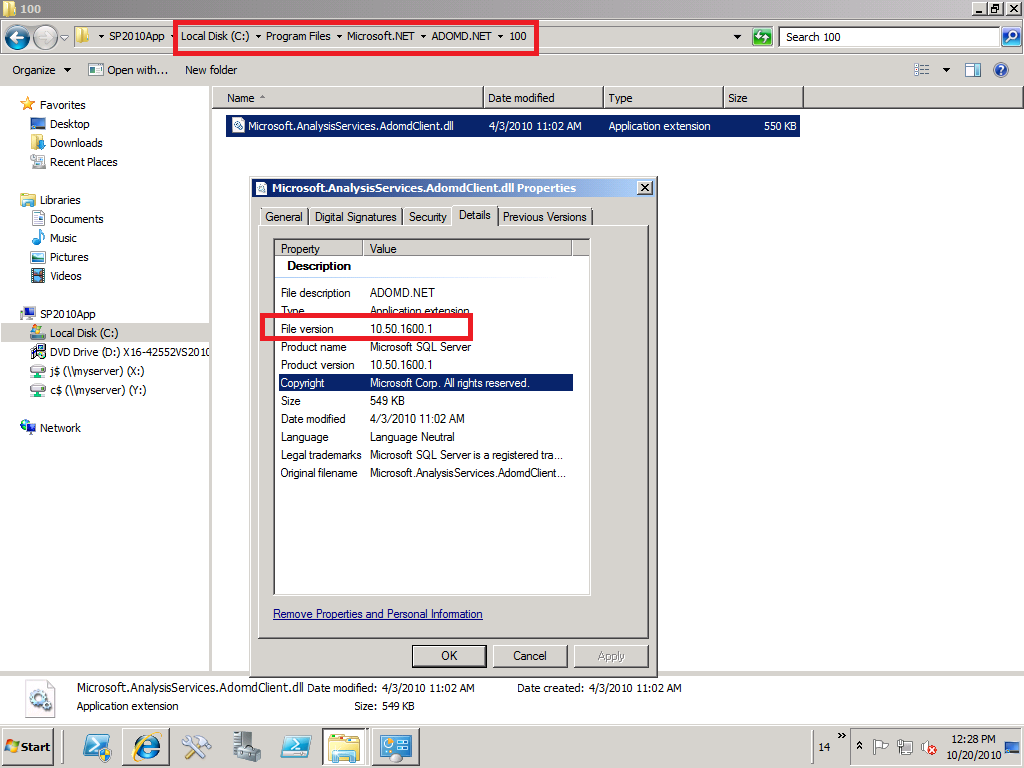
check the version of Microsoft® SQL Server® 2008 R2 ADOMD.NET

notice: sometimes the version from control panel is misleading, so it is better to check physical file's version:


To get this version, download SQL 2008 R2 Feature Pack.

4) Red X error on PowerPivot Workbook in PowerPivot Gallery
Disabling loopback on the WFE should resolve this problem, this is best available fix so far. See this KB for details.

5) Window Event Log error on Orphan database associated with PowerPivot Application
This one happens if you created a powerpivot application and deleted it later. Even though the database was deleted, but somehow it still stays in sharepoint metadata. Use PowerShell get-spdatabase to verify and delete it.

6)PowerPivot Workbook Data Refresh "Access Denied" error
this one occurs when
  • Unattended Account is not granted "contributor" permission from sharepoint site, or
  • SSS application's owner is not set as Farm Account (don't know why....)


Data Refresh is triggered by Timer Job, which first fire request to SSS for unattended account credential, and on success, use the unattended account to open data source. In case datasource is sharepoint resource such as a integrated mode report, unattended account need sharepoint permissoin to do that. Notice, all those happen without PowerPivot service getting involved at all at this point.

7) Data Refresh Error when use SSRS report as datasource:
Errors in the high-level relational engine. The following exception occurred while the managed IDbCommand interface was being used: The remote server returned an error: (403) Forbidden..
This error occurs when powerpivot Analysis Service try to access embedded SSRS report data. This call is made directly to SSRS by PowerPivot Analysis Service. As SSRS needs to check sharepoint permission of caller credential (which credential? when kerberos is implemented, it is PowerPivot Analysis Service Account. see this post for details), it throws the above error when the PowerPivot AS service account doesn't have sharepoint read permission. Notice: in this case, it is PowerPivot Analysis Service Account that will be ultimately passed to SSRS reporting data, not unattended account.

PowerPivot Data Refresh and Excel Refresh

PowerPivot Workbook has 2 kinds of data sources, one is from its Pivot table cache, and the other is from PowerPivot Analysis Cubs. Then what  about Data Refresh? PowerPivot Data Refresh is to refresh Analysis Cubs from external data sources, and as part of this refresh process, the workbook is updated as well.

The credential used for data refresh can be: Unattended account, embedded window credential, or SSS


Notice, there is no window authentication listed above, which means the logon user credential is never used for data refresh. So obviously data in Analysis Service is not security trimmed.

Also notice, it is PowerPivot System Service which retrieves data refresh credential and then sends to Analysis Service, since both PowerPivot and Analysis Service are guaranteed running on the same server, Analysis Service can delegate this credential further to external datasource without need of kerberos delegation.

Not to confuse PowerPivot data refresh with Excel refresh. Excel refresh happens when users click slicer or manually do data refresh. The result is, its cached pivot table get refreshed from .abf file or AS cubs ultimately. PowerPivot functions as Excel data source in this case.

As both Excel Service and PowerPivot service are claim aware, it is claim token that flow from Excel to PowerPivot System service. From PowerPivot to Analysis Service which is not claim aware, it is window token that flows thanks to Claim to Window Token Service. But the most interesting thing is, PowerPivot use PowerPivot Service Application account, not logon user account to connect to Analysis Service:


This is why there is no need to configure security in PowerPivot Analysis Service, but the question is, what is the security enforcement at Analysis Service level even with the note "PowerPivot System Service immediately downgrade the connection"?

the answer is it doesn't need to be, since the data refresh is just to refresh data in AS cubs, and they don't need to be security trimmed. Excel Service will enforce security when it connects to AS Cubs to fetch data.

The follow-up question is, does Excel Service account need kerberos delegation to AS? The answer depends, if Excel Service and Power Pivot run on the same server as they should, there is no hop and Kerberos is not required, if Excel Service and Power Pivot run on different server, Excel Service account should be granted a delegation right to AS and logon users should have read access to AS Cubs if window authentication in Excel workbook is chosen.

Oct 10, 2010

Dilema: which account to run SPUserCodeV4?

If you want to run sandbox solution, you have to run "Microsoft SharePoint Foundation Sandboxed Code Service", which is a SharePoint service wrapper for window service "SharePoint 2010 User Code Host", and has no service application associated with it.


By default, this service is run under sharepoint farm account, and results in a warning from SharePoint Health Analyzer.

You can certainly change it to run as a different managed account to suppress the warning, but you should be aware of its ramification: the managed account running this sandbox service will be granted some privileges similar to farm account, such as  db_owner roles for all WSS Content databases! And this role won't be reversed on later service account changes. This certainly violate least privilege rule.

Oct 9, 2010

other service accounts' database right and sharepoint permission: issues related with Excel, PerformancePoint and People Search

As recommended by this technet article, running sharepoint 2010 portal application under one service account, and running all other service applications such as Excel, PPS etc under other application pool accounts, if so, does any service application pool account have access to the portal's Content Database? Does any of them even have permission to sharepoint portal site?

Quoted in the same technet article:
Other application pool accounts

The other application pool account must be a domain user account. This account must not be a member of the administrators group on any computer in the server farm.


The following machine-level permission is configured automatically: This account is a member of WSS_WPG.


The following SQL Server and database permissions are configured automatically:
This account is assigned to the db_owner role for the content databases.

This account is assigned to the db_owner role for search databases associated with the Web application.
This account must have read and write access to the associated service application database.
This account is assigned to the WSS_CONTENT_APPLICATION_POOLS role associated with the farm configuration database.
This account is assigned to the WSS_CONTENT_APPLICATION_POOLS role associated with the SharePoint_Admin content database
The one in red is questionable: actually none of application service accounts has been granted db_owner for Content Database! This is the root problem of "The workbook cannot be opened" Error as described in this blog.

The same problem occurs to Performance Point Service, but PPS even has another anomaly: its service account has to be granted a "read" permission for "Data Connections" as described in this blog. Somehow PPS invoke RunWithElevatedPrivilge call to check user's permission on "Data Connections" library, and get access denied error. The error tells us that those service accounts don't even have sharepoint portal access!

Search Service Account and default content Account(crawl account) are generally granted full read access in the web application's "user policy", but even so, it doesn't mean either of them has content database owner right. Also notice that default content account needs to have "Retrieve People Data for Search Crawlers" right on Profile Service Application in order to crawl people profile or sps3://mysite. If you change the default content account, this right needs to be update manually.

Oct 6, 2010

SharePoint 2010: The Security Token Service is not available

This problem has been reported mostly from SharePoint 2010 beta 2 due to the missing of Hotfix KB 976462. SharePoint 2010 RTM has this hotfix included in the prerequisite as you can see it from window updates off control panel. so don't bother to download and install again:


But occasionally this problem occurs even to RTM sharepoint 2010.  The sharepoint Health Analyzer report it only as warnings, but it is actually a fatal error as it results in failure of all claim aware services such as search service, for example: When a user start searching, WFE needs to talk to Search query componet, and if the Search query is hosted in a different server, WFE needs its local STS to collect claim, and then sends the claim to Search query component Server. Obviously unavailability of STS on WFE will break things totally.


What is the fix then? STS is neither a SharePoint service, nor a window service, but actually a WCF web service, so first to check IIS if this web service or its application pool is running, and if they are, try to restart and if that still does not solve the problem. You need to re-provision STS service application. The STS service application is provisioned during sharepont configuration, and is not clickable from UI:


But it can be re-provisioned from Powershell:
$sts = get-spserviceapplication -identity {id of sts}
$sts.status  
online
$sts.provision()

Additionally, disconnecting servers from farm and rejoining them can also fix this STS problem.

Oct 4, 2010

SharePoint authentication mode to Reporting Servivce

SharePoint can use either "window authentication" or "Trusted Accont" authentication mode to connect its report services (essentially a web service).


in case of window authentication, it is logon user's credential flowing to RS, which is easy to understand, but implement window authentication/kerberos is generally mis-considered as difficult. For that reason, "Trusted Account" is provided as another option.

In case of trusted account, it is credential of application pool id that is passed over to RS. As RS by default allow all users, the authentication is not a problem. The challenge is, RS needs to check if the current logon user has permission to access report (essential a sharepoint list item in document library). RS doesn't have logon user's credential as it has never been passed in, but it does have SPUser object which Sharepoint impersonate on behalf of logon user. RS can achieve permission checking by using sharePoint object model.

At this point, RS can determine if the logon user has access to reports, but not report data itself. The report data access is enforced by each report's datasource:

As "trusted account" mode doesn't pass the logon user credential, the  report's credential can't use "window authentication/integrated" as shown above. In other word, only "window authentication" mode can use report's credential as "window authentication/integrated".

Oct 1, 2010

Don't install Sql Reporting Service with its service account as a built-in account

When you plan to integrate SSRS 2008 R2 with SharePoint 2010, it is a common scenario that DBA install SSRS and Sharepoint administrator does the configuration for integrate mode. Often times DBA just let SSRS run under a built-in account such as LocalSystem or NetworkService, and let a poor sharepoint guy do the rest of work. In order to run SSRS in an integrated mode, the first thing to do is to change its service account to a domain account. Then here comes the problem: in the sharepoint central admin, when you try to configure "Reporting Service Integration", you get an error saying failure to connect to RS!

Don't doubt about your typing skills or about your memory of your password or anything else (of course you need to check network communication between your sharepoint server and RS server, such as firewall etc). The problem is: if you ever run SSRS under a built-in account, the RS is automatically configured to run in a Kerberos authentication, and it stays that way even after the service account is changed into a domain account. Kerberos works by default if the service is running under a built-in account, but it breaks when service is running under a domain account unless you register the SPN.

As now you know why it breaks,  the solution is simply, either manually change the authentication type to "RSWindowsNTLM" in reportserver.config. or register SPN to the domain service account. see this post for details.