Jan 4, 2010
SharePoint Workflow: onTaskChanged inside While Activity


Jan 1, 2010
deploy sharepoint solution in Visual Studio 2010 (beta 2)
"SQL database login for 'sp2010_SharePoint_Config' on instance 'spsql' failed. Additional error information from SQL Server is included below."
Most likely it is because the window login account IS a local Administrator account And it doesn't have permissions on either configuration db or content db. Unfortunately this is a quite common case though. VS only prompts to "run as Adminstrator" if window login account is NOT a local Administartor account. In other word, if user login as a non-adminstartor account, VS will prompt user to run VS "run as administrator", and user has a chance to choose a farm account or service account to run VS. But if user login as an account with local administartor privilege, VS won;t promot even if the login account doesn;t have sharepoint db permission.
This also means you can't run VS as a local account to deploy sharepoint solutions unless SQL sits in the same box.
Dec 15, 2009
Create a sharpoint webpart in Visual Studio 2010
this.page.LoadControl(_ascxPath);
In theory, a control can be added through
- dynamically in CreateChildControls() of web part file
- declarative in ascx file of user control
- dynamically in Page_load() of user control's code behind
adding a custom property is very easy now, all need to do is add the following 2 attributes to any property: [WebBrowsable(true), Personalizable(true) ]
in .webpart, you can add default velues just as any other OOB properties
As custom properties are open to injection of user script (good or bad), SharePoint 2010 introduce 2 new flags to enforce security at both webpart level and property level:
SafeAgainstScript attribute in
[RequiresDesignerPermission] attribute for web part's property
see here for more details
Dec 11, 2009
Create a custom SharePoint application page and use ECMAScript ClientOM
* copy from any application page from layouts/
* delete all contents in <asp:Content id="PlaceHolderMain" >
*change the page inheritance to: Microsoft.SharePoint.WebControls.LayoutsPageBase
*Find the buttons template section:
<Template_Buttons>
<asp:Button UseSubmitBehavior="false" runat="server"
class="ms-ButtonHeightWidth" OnClick="BtnUpdateWeb_Click"
Text="<%$Resources:wss,multipages_okbutton_text%>" id="BtnCreate"
accesskey="<%$Resources:wss,okbutton_accesskey%>"/>
</Template_Buttons>
* Define OnClick function.
<script runat="server">
protected void BtnUpdateWeb_Click(object sender, EventArgs e) { ...}
</script >
*Note: The above template also defines both "OK" and "Cancel" buttons on the page.
by now, it should be a functioning application page, and you can load ClientOM by adding the follwoing in any asp:content:
<SharePoint:ScriptLink runat="server" Name="sp.js" OnDemand="true" Localizable="false" />
Then you can use ClientOM in any javascrip such as:
function retrieveWebSite() {
var clientContext = new SP.ClientContext.get_current();
this.oWebsite = clientContext.get_web();
clientContext.load(this.oWebsite); //this is to make oWebSite available in client
oWebSite........
clientContext.executeQueryAsync(...)
}
Dec 3, 2009
SharePoint Content Deployment
- Target SharePoint server has to be configred to accept "incoming content deployment jobs" and check "Do not require encryption" if SharePoint Central Admin site is not using SSL;
- Target SharePont site collection has to use blank template;
- Deploymentmanifest.xsd (under 12 hives\Template\xml on Target SharePoint Server) has to add the followings (this only requires for 32 to 64 bit mix)
<xs:attribute name="AllowAutomaticASPXPageIndexing" type="xs:boolean" use="optional" >
<xs:attribute name="ASPXPageIndexMode" type="xs:string" use="optional" > < xs:attribute name="NoCrawl" type="xs:boolean" use="optional" >
< xs:attribute name="CacheAllSchema" type="xs:boolean" use="optional" >
Nov 17, 2009
RSS Viewer web part bug
- on window 2008, it can view authenticated feeds from its own site, but it is win2k8 only. on both window 2003 and window 2008 R2, it requires SPN registration (delegation not necessary) and Kerberos in order to view authenticated feeds;
- if both feeds and RSS Viewer on the same server, only consuming web application (RSS Viewer host) needs Kerberos even if feeds are from other web application with different application pool;(on window 2008, it only requires IIS kerberos setting, no SPN needed)
- the above apply for both moss and sharepoint 2010;
When you view a private feed, you may also get the following error:
"An unexpected error occured processing your request. Check the logs for details and correct the problem."
It happens when you use a non-default zone URL for sharepoint site: (update 03/31/2010: this appears not to happen on sharepoint 2010 beta2)

With AAM setting like this:

It works if using the default zone URL:
 (update 03/31/2010) Reference: SharePoint 2010 and Kerberos by Spence Harbar
IIS 7 Kerberos authentication for SharePoint
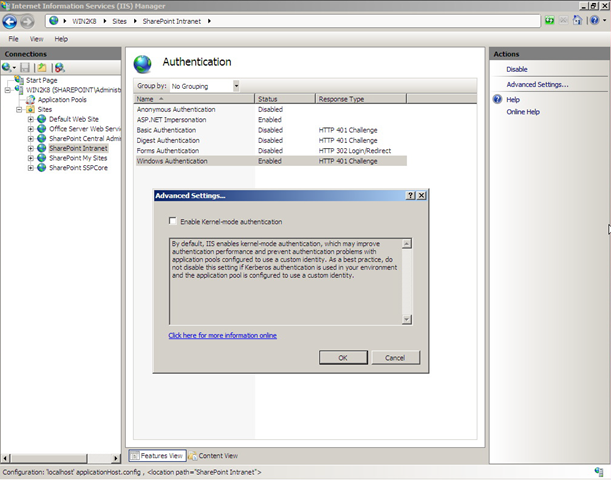
 In order for SharePoint to use Kerberos authentication, it has to be disabled: (update 04/01/2010: sharepoint 2010 disable this by default!!)
This is necessary because Kernel Mode can't work with multi-server sysem where you can't register same SPN to multiple server accounts.
add custom sharepoint web service in VS 2008
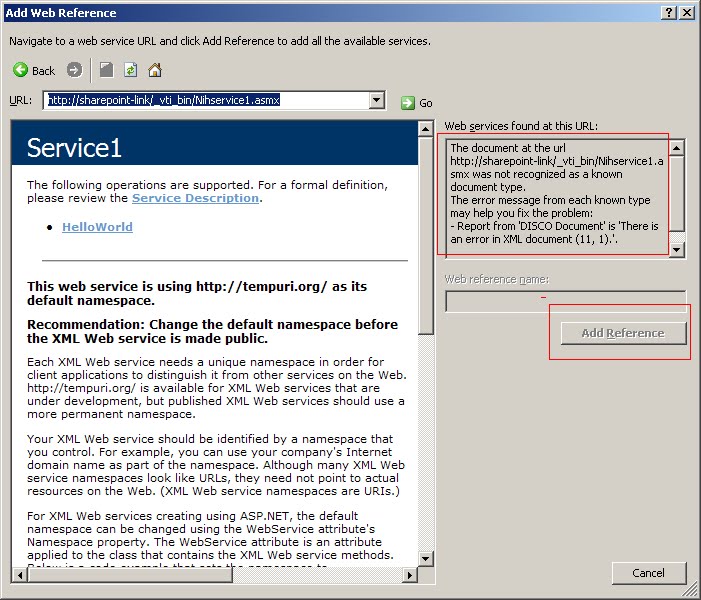
It turns out you have to append ?WSDL :
 A custom sharepoint web service needs to be put in _vti_bin to be trusted. Otherwise either SharePoint trust level or CAS policy need to be modified.
Sep 23, 2009
SPGridView Paging and Filtering
<sharepoint:spgridview id="SPGridView1" runat="server" >
<pagertemplate ></pagertemplate>
</SharePoint:SPGridView>
instead the following code works:
protected override void OnLoad(EventArgs e)
{
SPGridView1.PagerTemplate = null;
}
After paging is enabled, another common issue is, filter is off after navigating pages. I know filter is off acturally on every subseqent postback, like sorting. But to some degrees, it makes senses to turn it off since users are given no indication that a filter is on otherwise, which can certainly cause some confusion. But turning filters off on paging is very unsatifactory.
Inspired by the idea in this post, here is what I did to enable filtering across pages (based on .Net 3.5):
first cache filter settings :
protected override void OnPreRender(EventArgs e){
ViewState["FilterExpression"] = ObjectDataSource1.FilterExpression;
base.OnPreRender(e);
}
secondly, set filterexpression when postback is from pagings:
protected override void CreateChildControls() {
arg = (string)req.Form["__EVENTARGUMENT"];
if (arg.StartsWith("Page$") && ViewState["FilterExpression"] != null)
ObjectDataSource1.FilterExpression = ViewState["FilterExpression"].ToString();
}
related reference:
http://geekswithblogs.net/mnf/archive/2005/11/04/59081.aspx (.Net 2.0)
http://forums.asp.net/p/1067215/1067215.aspx (.Net 3.5)
Sep 7, 2009
Activating Sharepoint Timer Job
When activating from other web application whose pool id is not farm account (by best practice, it should not), you may see one or both errors as follow:
- In browser, "unknown error" and in window event log, "EXECUTE permission denied on object 'proc_putObject' "
Workaround: assign application pool id as db_owner of sharepont config database
After that, you might get anohter error (if the app pool id is not sharepoint server local admin) when you try to activate (with permission on config database, you can now unactivate feature, but not activate)
- In browser, "HTTP 403 error (someone saying 404 error), and in ULS log, "...Microsoft\SharePoint\Config\bd189eb6-92d0-4ca5-87b0-770f542e3f0a\cache.ini' is denied"
Workaround: assign full control permission to application id for that folder or add app pool id into WSS_ADMIN_WPG group.
But the real solution is to activate timer job feature in the central admin, which means you need to create a feature of web application scope.
Sep 3, 2009
SharePoint databases part 2
SharePoint_config database:
- install account is its dbo
- farm account (and local admin) in db_owner role
- application pool account in WSS_Content_ApplicationPoolid role
Central_Admin database:
- same as config except that local admin is not in db_owner role
Content database:
- farm account is dbo
- app pool account and ssp service account are in db_owner role
SSP (and SSP Search DB):
- same as content database, plus search service account is in db_owner
Server Roles:
- Install account has dbcreator fixed server role & securityadmin fixed server role.
- Farm account has the same fixed server role, but it is automatically configured.
- other service only has public server role.
Understanding those and sharepoint application pool id (see this) can help to solve a lot sharepoint database permission issues such as :EXECUTE permission denied on object 'proc_putObject' in event log tells that the application pool id doesn't have write permission on configure database.
Aug 13, 2009
HTTP authentication on redirect
- Server A: Request.Credentials = CredentialCache.DefaultCredentials Sent request to Sever B
- Server B: returns 401 – List of login schemes supported From Secured web page
- Server A: Sends Request + Request.Credentials (formatted according to the selected login scheme) to Server B
- Server B: returns 302 – "Redirect to Server C"
- Server A: Request sent again to Server C
- Server C: return 401 – List of login methods supported From New secured web page
- Server A: Request + Request.Credentials (formatted according to the selected login scheme) to Server C
- Server C: returns 200 – Content From New secured web page
Why auth handshake always happen even if the credential is set? This is by design, because Httprequest clients have no idea what auth schema the remote server is using. You can avoid first auth handshake by manually setting HttpRequest's header, like: req.Headers.Add("Authorization", "basic " + base64); But this needs to be done every time even for same Uri-Pref. Generally allowing handshake and setting PreAuthentication=true is better. See this post for details.
When making HttpRequest, HttpRequest object need to have a CookierContainer, which will be used by HttpResponse to fill in. It doesn't do anything with authentication though.
Another thing related is, in case of impersonating, Kerberos (both authentication and delegation) is required in order to forward default credentials (double hoppings).
Aug 10, 2009
core.js in sharepoint master pages
<sharepoint:scriptlink language="javascript" name="core.js" Defer="true" runat="server" / >
in layouts/application.aspx, it is loaded without deferred:
<sharepoint:scriptlink language="javascript" name="core.js" runat="server" >
The impact of this difference is, you can override javascript functions in application pages (layouts pages), but you can't do that to site pages.
Jul 29, 2009
SharePoint Page Provision
Application Page-- Pages in _layouts/ directory
Site Page-- ghosted site pages such as default.aspx
pages loaded in sharepoint document libraries
For pages in sharepoint document library, no server code is allowed by default, unless you change PageParserPaths in web.config. See this blog for details.
For both Application Page and Site Page, you can add server code in one of 3 ways:
- inline code (code render or declartion blocks)
- add user controls, for example: <%@ Register TagPrefix="XXX" TagName="lookup" Src="~/_controltemplates/LookupDefaultValue.ascx" % >
- inherits from code behind. Such as : <%@ Page inherits="CodeBehindDemo" % >. The trick is SharePoint dones't allow either CodeBehind or Src attributes. You have to use dll instead:
controls or methods used in aspx page need to be defined in the code behind with either protected or public access.
for site page, the dll also need to be in the safe control list in web.config.
Another option, less desired, is to use CodeFile attribute in Web Site Project. It requires putting .cs source files into the layouts directory. Some people even developed user controls with CodeFile in layouts or controltemplate and use SmartPart or self-developed webpart loader (loadControl) for web part development.
Jul 25, 2009
Configure and Test SharePoint Incoming Email in Window Server 2008
1.install SMTP in both WFE( for incoming email) and Application Server (for outgoing email);
2.check services in CA to make sure WFE is running "incoming email service" and Application Server is running "outgoing email service";
3. Create a DNS MX record such as:
(same as parent folder) MX [10] spweb.sp.local or
moss MX [10]spweb.sp.local
this essentially tells spweb.sp.local is the mail server for the domain of sp.local or subdomain moss.sp.local. read here for more details.
4. Configure mail server's SMTP domain list to include an alias of sp.local (for normal user email address, used to test SMTP extension/pop3) and an alias of moss.sp.local for sharepoint email enabled lists:
 5. Configure "incoming setting" in CA
- allow farm to receive email
- specify email address such as moss.sp.local
- specify email address for a sharepoint list, such as sharedDoc@moss.sp.local
- check "yes" on "Save original e-mail"
- install SMTP extension (pop3). This is a necessary (and hard) part since Win2k8 doesn't have POP3 built in.
- open window firewall at port 110 (for pop3)
- create an outlook account for testing:
* Email address ends with one of SMTP domain alias list such as admin@sp.local
* setting smtp server (not confused with sp outgoing eamil server) and pop3 server (iP address, not Netbios)
* user password to logon to pop3 server (defined in smtp extension's configure.xml located in "c:\ProgramData\ppedv\visendosmtpextender")
Overall, the very simiplied picuture is: mail client asks its local SMTP to send an eamil to shareddoc@moss.sp.local)-> outlook's local SMTP server ask DNS,who is mail server for remote domain sp.local ? -> find MX record from DNS ->logon to remote mail server SMTP-> check for mail domain moss.sp.local: if it doesn't exisit, mail sending fails there. If it does exist, mail goes to SMTP's drop folder and stay there waiting for SharePoint Timer Job to pick up and put into the assocaited list. For regular user email, mail client using POP3 will do the pickup job, and the only difference is regular user email has its individual subfolder under the drop folder root.
Jul 23, 2009
Moss 2007 and Server 2008 window firewall
- WFE: running web application,search query,and incoming email service
- Application: running Central Admin, Indexing (no query), outgoing email service and all other services
- SQL: sql 2008
- can't browse Central Admin from anywhere other than Application server
Window Firewall only open Http at port 80. open an exception at CA port in App server to fix this problem.
- Office Search Service or SSP can't be configured
Sharepoint SSP use web service call at port 56737. open exceptions on both WEF and App servers to fix this problem. If no query server is specified, configuration "looks like" it can go through, but "check service enabled in farm" disclose problems. Be sure to check it.
- Index Propagation fails
Sharepoint use SMB (File Shareing) protocol to push index from Index to Query server (WFE in this case). Open "File and Printer SharePoint" exception to fix this problem.
reference: http://blogs.msdn.com/joelo/archive/2007/02/13/protocols-ports-and-firewall-rules.aspx
Jul 19, 2009
Window Server 2008, Hyper-V and Wireless Connection
1) Convert Vista to Win2k8.
Booting with Win2k8 CD. There are choices of either formating disk or replacing Vista. I chose the latter since I don't need to install drivers again.
2) Setup wireless connection
First need to enable wireless feature for win2k8:
 Secondly need to update wireless driver: no Window 2k8 wireless driver availabe, but I can use Vista's driver: the win2k8 installation process save all vista drivers in Windows.old folder. I use "Update Driver" option in Device Manager:
 3) enable RDP.
Since I build this as my work platform, I need to access anywher via RDP:
- need to Change "Remote" Option: Computer->Properties->Remote Setting->Remote
- enable Hyper-V role of Win2k8. This adds some dependent feature as well.
- turn on Hardware Assisted Virtualization: On Intel platforms, Turn VT on in the BIOS (on AMD platforms, AMD-V is on all the time) http://www.microsoft.com/windows/virtual-pc/support/configure-bios.aspx http://www.sysprobs.com/disable-enable-virtualization-technology-bios
First time when I created VMs, they don't have any network connection even if I have wireless connection for my phsical server. It turns out Hyper-V doesn't support wireless adapters. The workaround is:
- create a virtaul network in Hyper-V's Virtual Network Manager and then bridge it with wireless connection (details).
- Then run Hyper-V to create VMs with the virtual network connection created above.
Since I also want to RDP from my phsical server to VMs ( I can certainly connect to them, but if I RDP to my server first and then connect to VMs, window key combination can't go through to VMs) , I enabled RDP as I did to my physical server. But to my surprise that only allows me to use IP address! When i use VM BIOS, it said it can't find the server! I looked at my router's DNS, the VM BIOS name is not there. and I can't add it (get "entry already exist" error) for some reasons. As a workaround I open Window FireWall for PING (see here on how to ping), and I can then RDP its BIOS name.
5) promote Domain Controller
- run dcpromo.exe (detail)
- disable IP6 for DC vm's connection and configure IP4:
 since my server is From DHCP, DC vm need a static IP address and its DNS server should point to itself details
I have create other 2 VMs also runing Win2k8, and need to join them to the Domain I just created. To do so, the only trick is to set each VM's DNS server to DC/DNS VM IP(otherwise it will go to my home router's DNS instead), and then change WorkGroup to Domain just like changing computer's BIOS name. DC will add VM server into AD once it is joined, and DNS server will dynamically add VM's name into dns table once VM is connected.
by now I have a farm of 3 virtual servers running on a sub domain (or virtual sub net). It was a long weekend, but I am so happy about Hyper-V. It really rocks!
Jul 15, 2009
SharePoint Managed Path and IIS ISAPI

Update 04/05/2010: IIS will do authentication,and after that the request is yielded to the SharePoint14Module, which will contact file system first and then content database for appropriate page. See this blog for details.
Update: this exception only applies to MOSS and WSS 3.0, it is fixed in SharePoint 2010. great fix, no more confusing.
Jul 13, 2009
SharePoint and WebDav
On the client side, there are some requirements:
- need Office 2007 installed;
- Windows XP: Web Client is installed and enabled (by default).
- Windows Vista: The Web Folder service needs to be started.
- Windows 2008 (and R2): The Desktop Experience feature needs to be installed.
- enable "client integration"
- enable Cookies by checking "Auto sign me"
- window XP need to install hot fix Webfldrs-KB907306-ENU.exe

Jul 1, 2009
SharePoint Authentication and IIS
- first it looks for the site listening to port 80 with header as sp.company.com. If it is found, it is selected;
- Otherwise, it looks for the site without any header and listening to any unsigned ip address at port 80. If there is one, it will be selected for authentication;
- If neither is found, IIS error out
Notice the URL doesn't have to point to the WFE. for example, in the case of Load Balancer, URL points to LB, not WFE.
After authentication succeed, It is up to SharePoint to serve the http request. SharePoint provides content solely based on its AAM configuration, i.e, it must have that specfic FQDN configured (in the prvious example, it is sharepoint.company.com), otherwise, it errors out.
Notice in some scenario, IIS site which does authentication can have a different FQDN than that in SharePoint AAM.