Showing posts with label IIS 7. Show all posts

May 20, 2011

configure ASP.NET impersonation authentication in IIS 7 and forward user credentials

If you just add  in  web.config aiming to configure impersonation for a IIS 7 web site, the site will be broken immediately with a HTTP 500 error.

The reason is that Application Pools in IIS 7  have  "Managed Pipeline Mode" defaulted as "Integrated", under which impersonation doesn't work. Changing from "Integrated" to "Classic" is the fix. If you check all application pools for sharepoint application, they are all set as "Classic".

Since IIS 7 use Kernel Mode for authentication, and if you are using server BIOS name as URL, you get Kerberos authentication for free (see this blog for details). Does this mean, with impersonation in place,  you can forward logon user's credential to next hop? for example, setting credential before calling web service such as:

svc.Credentials = System.Net.CredentialCache.DefaultCredentials; 
 
You still need delegation right for your service account (or machine account?) to make that hop happen. Otherwise you simply forward a empty credential to the web service, and if the web service is not anonymous, the call will fail.
 
 
In case of NTLM authentication, logon users' credential can not be forwarded by any means.

Jul 9, 2010

IIS 7 Kernel Mode Authentication, Kerberos and DNS Alias (CNAME)

The main idea of IIS 7 Kernel Mode Authentication is to allow HTTP.sys to handle authentication, which means the computer account running HTTP.sys (not application pool account)  will be used during authentication negotiation (see this post for negotiation details).  If site URL is constructed from server name, kerberos will work automatically regardless of app pool account, since Host/servername is registered when servers join domain. If site URL is not constructed from server name, negotiation will choose NTLM unless SPN is registered correctly with the server computer account. If SPN is register by mistatke with any other account, the negotiation chooses Kerberos, but authentication can never go through.


This is a huge improvment over IIS 6.0 with its infamous 401.1 deny issue when site URL is constructed from NetBIOS and IIS pool account is a domain account. 

CNAME is generally considered not good for kerberos (particulary for IIS 6), since the kerberos client is  not to ask SPN with CNAME. For instance, if intranet.company.com is an alias to server1.company.com, the client is going to ask KDC for http/server1.company.com, not http/intranet.company.com. This doesn't necessarily mean CNAME will break kerberos: in case of kernel mode, CNAME actually make kerberos work without the need to registering any SPN (in contrast, if it is an "A" record in DNS, SPN, http/intranet.company.com, will have  to be registered to the server machine account)

Does this mean Kernel Mode is a silver bullet for kerberos? No, kernel mode won;t work for Load Balance situation with multiple WFEs: it is impossible to register the same SPN for more than 1 server machine account.

So for system designed to be multiple server farm such as SharePoint, Kernel Model has to be unchecked in order to configure Kerberos.

As best practice, for multiple server system, turning off Kernel Mode and then handling authentication the same way as IIS 6. For single server, don't truning Kernel Mode off (instead registering SPN correctly when needed to configure Kerberos). If site URL is server name, truning off Kernel Mode will result in authenticatin fail. See this http://support.microsoft.com/kb/871179 for details.

Note: even though Authentication works, it doesn't mean delegation work as well. computer account is NOT granted delegation right by default.


Even though the kernel mode in IIS as well as CNAME record in DNS make debugging kerberos very difficult, but the basic rules still stand:
  • if kerberos client won't be able to get the SPN either because SPN is not registered or is duplicated, the negotiation falls back to NTLM.
  • if Kerberos client can get the SPN, negotiation ends with Kerberos (see negotiation process here)
    • If the SPN is registered to a wrong account, A SPN must be registered to a correct account: either server computer account (in case of kernel mode) or application pool domain account. If it is registered to a different account, the kerberos authentication will fail, normally you get prompted indefinitely and can nerve get in.
    • If the SPN is registered to the right account, either server computer account (in case of kernel mode) or application pool domain account, authentication succeed then.

Nov 17, 2009

IIS 7 Kerberos authentication for SharePoint

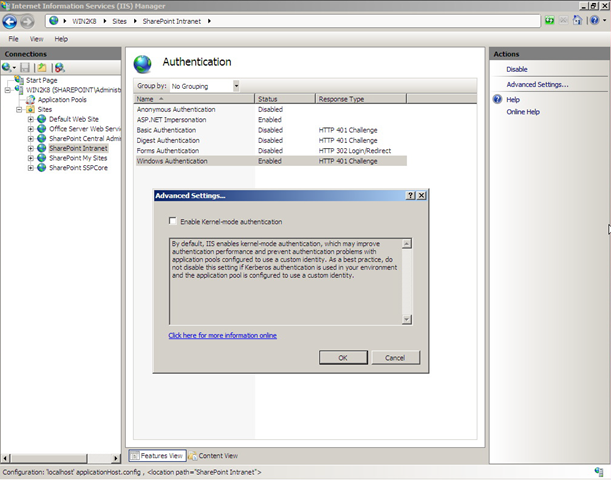
IIS 7 has a new feature called Kernel Mode Authentication, it can be found off "Advance Settings.."

In order for SharePoint to use Kerberos authentication, it has to be disabled: (update 04/01/2010: sharepoint 2010 disable this by default!!)


This is necessary because Kernel Mode can't work with multi-server sysem where you can't register same SPN to multiple server accounts.

see here for IIS authentication negotiation process


NONONO In IIS 6, as long as NTAuthenticationProvider is set as "Negotiate, Kerberos", whether SPNs are registered or not, server granted Kerberos authentication. But IIS 7 seems to be of SPN awareness during negotiation regardless of Kernel Mode on or off: it only agree on Kerberos when the App Pool ID account has SPN registered, otherwise it falls back to NTLM.


Feb 16, 2009

Hookup SharePoint outgoing email with your Email vendor

update on window server 2008 configuration. First read this post. Following that post, you can setup sharepoint outgoing email IF your target email server accepts annonymos relay or don't need authentication from your sharepoint smtp server. But in case that you want to send to gmail or hotmail or like the following scenario where your company outsources email server to a third party, continue to read:

I ever had a client who outsource their Email service to a vendor, and the vendor doesn't accept anonymous relay, in stead they require authentication. OOB there is no place for SharePoint to provide this info, can sharepoint outgoing email still be set?

Yes, you can. Use sharepoint local smtp and configure its delivery outbound security:

First change relay restriction:


Then configure Security of outbound Delivery:

There you have option to choose authentication mode and enter credentials.
After that, you need to configure smart host by clicking "Advanced" button. Your mail vendor should provide your smart host name.

update on Win2k8: IIS 7.0 SMTP setting has no effect on sharepoint mail outgoing. All you need to configure is IIS 6.o SMTP.
update on sync of user AD info(including email): user AD data are sync-ed with sharepoint profile data by "profile import", and user info which are displayed on sharepoint team siteis actually stored content database, and are sync-ed with Profile data by 2 timer jobs:hourly Profile Syncronization and minutely Quick Profile Syncronization.
So after you change AD data, you must do the followings before seeing new info on sharepoint site (such as email address for alert)
  1. import Profile;
  2. wait up to 1 hour for existing users,
or
delete users from site collection and add them back in (to trigger Quick Profile Sync timer job, which only applies to newly added users)