Showing posts with label web service. Show all posts

Oct 21, 2011

SSL certificate handshake and web service error: The Underlying Connection Was Closed. Could Not Establish Trust Relationship with Remote Server

In SSL, Client and Server authenticate each other's certificate. The handshake process is illustrated as follows:
Note: It is optional for Server to authenticate Client's certificate. It is configurable in IIS site->SSL Settings. By default it is "ignore". In a rare occasion client certificate is "required", the handshake will fail if  client certificate is not present and you will get "403.7 Forbidden " error in browser. In ASP .Net Web code, some people suggest getting around this by sending client certificate to server, but I have not tried it.

On the other side, Client is always required to authenticate server's certificate. Browser will popup a security alert when  server certificate is not valid/trusted. you can depress the alert by installing the certificate into both "Personal" and "Trusted Root Certificate Authority" locations in client machine's certificate store.

you can check the store by MMC->Add Snap-in->Certificate-> My User(Computer) Account.


Things are different if you call SSL web service from .Net ASP Web. you often get this error:
The Underlying Connection Was Closed. Could Not Establish Trust Relationship with Remote Server

The reason is the computer maintains two different certificate stores:
  • The local machine store: An ASP.NET Web application looks in this store to locate client certificates.
  • The local user store: An interactive user application looks in this store to locate client certificates.
So, in order to solve above error in .Net code, you will need to import the same server certificate into Local Machine Store on both "Personal" and "Trusted Root Certificate Authority" location. Also you need to grant  the service account running ASP .Net Web has sufficient right to access the Local Machine Store. ( using local admin right is not good idea, but good enough to run a test). See here for details.


Another workaround  which are quite "popular", but bad, is to bypass security handshake totally. See here for details. the killer is System.Net.ServicePointManager.ServerCertificateValidationCallback += delegate { return true; }; 

May 27, 2011

Implement AJAX & Backend Services

Way to implement Ajax:
  • use Sys.Net.WebRequest to call backend service (ASPX, ASMX or ASHX)
  •  server side ajax enabled WCF service
    • use asp:servicereference to emit script proxy for client script to call WCF service
  • client side Ajax Library:  http://microsoftpdc.com/Sessions/FT29
  • Ajax Toolkit (server side Ajax controls)


What backend services to call?


WCF or ASMX?
  • WCF/REST: Async friendly, abstract complexity (serialization/deserialization etc) web friendly, Binary, format of choice (Json/xml/image etc.), end to end
  • Session Http cookies
  • SOAP based web service asmx: overhead, xml only, computing distribution

May 25, 2010

sharepoint anonymous users: what they can do?

When a web application is anonymous enabled, each site collection can define whether anonymous users can access whole site or just lists/libraries or nothing. Anonymous users will assume "limited access" permission role. This special permission role  is not configurable, but  it does have 2 flavors: with or without LockDown mode. The most significant difference is the lockdown mode takes away the following 2 permissions from anonymous users:
  • Site permissions: Use Remote Interfaces. It will prevent web service (SOAP), WebDav and SPD connection to sharepoint sites;
  • List permissions: View Application Pages. It will prevent anonymous users from view list form pages such as allitems.aspx, edititem.aspx etc
The lockdown mode is automatically turned on when a publishing portal site template is used or it can be turned on by stsadm command. see here for details.

Anonymous users will be challenged or prompted when they try to access resources which are not granted by the "limited access" role. Anonymous users can access sharepoint resource only by server object model, not by web service (either asmx or wcf) regardless whether site is anonymous enabled or whether lockdown mode is turned on. The only workaround is for readonly web service as described in the following 2 posts:

exception: for readonly and SOAP version 1.1(asmx): modify SOAPAction Header:
http://mdasblog.wordpress.com/2010/03/18/allowing-anonymous-access-with-sharepoint-web-services-and-spservices/
http://weblogs.asp.net/jan/archive/2009/05/25/quot-the-security-validation-for-this-page-is-invalid-quot-when-calling-the-sharepoint-web-services.aspx

Otherwise web service call must carry a valid credential. However if web services doesn't involve any object model, anonymous users can call those kinds of web service even if those web services are hosted inside sharepoint.

WCF services add another level of security with security binding configurations for each endpoint. WCF endpoint security along with hosting IIS authentication setup together will determine if anonymous users can invoke WCF services. See here for details.

If the web service is custom web service and using sharepoint object model, the web service need to be in viti_bin, or sharepoint CAS policy need to change. As any web service with sharepoint object model involved, they are not open to anonymous users any way.

In sharepoint 2010, at web application level, there are 2 new policies: Users Policy and Anonymous Policy, which can deny individual uses or all anonymous user's access to an anonymous web application.


Anonymous users can't access to sharepoint application pages under _layouts folder as most sharepoint application pages inherit from LayoutPageBase which is a secure page, nevertheless some application pages inherit from UnsecuredLayoutPageBase such as searchresults.aspx, login.aspx etc, which are open to anonymous users.

Nov 17, 2009

add custom sharepoint web service in VS 2008

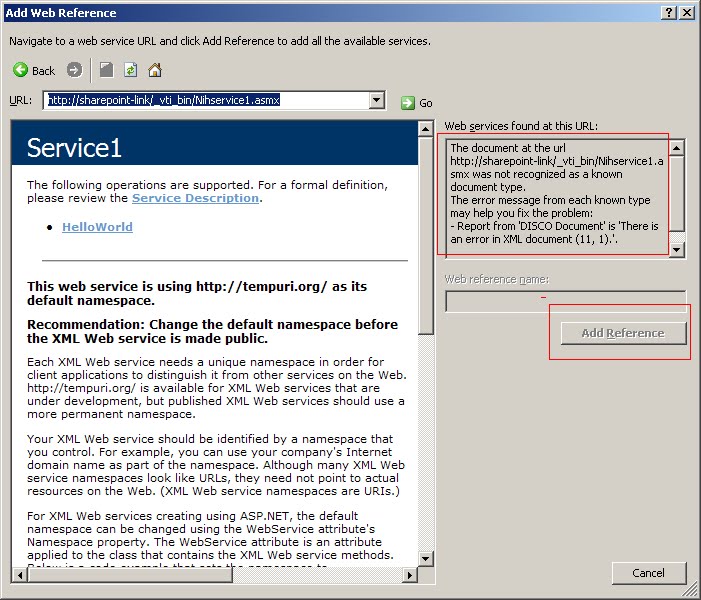
This article gives all you need to create a custom web serice in SharePoint 2007. But when adding a custom service in Visual Studio 2008, get the following error:


It turns out you have to append ?WSDL :


A custom sharepoint web service needs to be put in _vti_bin to be trusted. Otherwise either SharePoint trust level or CAS policy need to be modified.