SharePoint 2010 have Session State disable by default, in contrast, SharePoint 2007 has Session State enabled by default.
why? does not SharePoint 2010 need any session state?
but first, what is the session state? Session state is a part of state management. State management is the information that ASP .Net need before processing page request, i,e, what is the values of controls or variable on the page? Those infomation is normally handled by mechanics such as View State, Query String, Hidden Fields.. Those are called client side mechanics because the data is stored at client side. Session State is different in that it is server side (only session id is sent to client via cookie or query string) and its main purpose is to remember if a request is a new or existing one by session ID.
So why SharePoint 2010 don't need session id? SharePont Form service needs session state (SP State Service) in the scenario of multi-page forms, other than that SharePoint doesn't need to track session ID in general. Turning on Session state can potentially degrade performance as SharePoint does not automatically remove old session state records from the session state database tables, and there is only one session database for sharepoint farmwise. see Todd Carter's blog for cautions while using SharePoint Session.
what is the implication of this new setting in sharepoint 2010? It now becomes recommendation that affinity or Sticky session be set for Load Balancer. See this blog from SharePoint Joe.
Showing posts with label web development. Show all posts
Showing posts with label web development. Show all posts
Jan 11, 2011
Mar 11, 2010
lessons learned when debugging http traffic in Fiddler 2
When I debugged an ajax web service call to SharePoint listdata.svc, I often get a HTTP 400 error, which made me think something wrong with REST content format. It turns out it is because Fiddler Request Builder will not take white space!

Instead of typing in %20, a easy way is, first use IE browser and then in Fiddle Sessions window, copy its url to its Request Builder.

Secondly, if your web site makes another http call, the second http traffic will not be tracked if you run your web site from Fiddler. But they are tracked if run from browser.
Last, but not least, Fiddler 2 seems to work fine now with http://localhost/ , but is kind of tricks: if your website make a http call such as
request.set_url(http://localhost/_vti_bin/ListData.svc)
the traffic of this request will not be tracked in Fiddler


Jan 17, 2010
Load CDN hosted JQuery
Since loading JQuery libraries from Content Delivery Network (CDN) has many advantages over hosting locally, I adopt this approach today by using script tag as:
<script src="http://ajax.microsoft.com/ajax/jquery/jquery-1.3.2.js" type="text/javascript" > </script >
I didn't expect any problem in doing that, but to my surprise, I kept getting "object expected" error on VStudio debugger. I tried with Google CDN, same error.
The error indicates that JQuery is not loaded, but what causes it? It turns out this IE setting is the reason, somehow "Active Script" is disabled in my Win2k8 Web(SharePoint 2010) Server:
 Don't believe this could be a common case, but it proves CDN hosted JQuery relies on browser settings, and can fail. So the best practice is to always provide a failover to local JQuery libraries.
<script src="http://ajax.microsoft.com/ajax/jquery/jquery-1.3.2.js" type="text/javascript" > </script >
I didn't expect any problem in doing that, but to my surprise, I kept getting "object expected" error on VStudio debugger. I tried with Google CDN, same error.
The error indicates that JQuery is not loaded, but what causes it? It turns out this IE setting is the reason, somehow "Active Script" is disabled in my Win2k8 Web(SharePoint 2010) Server:
 Don't believe this could be a common case, but it proves CDN hosted JQuery relies on browser settings, and can fail. So the best practice is to always provide a failover to local JQuery libraries.
Sep 23, 2009
SPGridView Paging and Filtering
A common issue with SPGridView is to enable paging: the PagerTemplate property of SPGridView needs to be set as null. If the SPGridView is declaratively defined in aspx page, the following code won't enable paging:
<sharepoint:spgridview id="SPGridView1" runat="server" >
<pagertemplate ></pagertemplate>
</SharePoint:SPGridView>
instead the following code works:
protected override void OnLoad(EventArgs e)
{
SPGridView1.PagerTemplate = null;
}
After paging is enabled, another common issue is, filter is off after navigating pages. I know filter is off acturally on every subseqent postback, like sorting. But to some degrees, it makes senses to turn it off since users are given no indication that a filter is on otherwise, which can certainly cause some confusion. But turning filters off on paging is very unsatifactory.
Inspired by the idea in this post, here is what I did to enable filtering across pages (based on .Net 3.5):
first cache filter settings :
http://forums.asp.net/p/1067215/1067215.aspx (.Net 3.5)
<sharepoint:spgridview id="SPGridView1" runat="server" >
<pagertemplate ></pagertemplate>
</SharePoint:SPGridView>
instead the following code works:
protected override void OnLoad(EventArgs e)
{
SPGridView1.PagerTemplate = null;
}
After paging is enabled, another common issue is, filter is off after navigating pages. I know filter is off acturally on every subseqent postback, like sorting. But to some degrees, it makes senses to turn it off since users are given no indication that a filter is on otherwise, which can certainly cause some confusion. But turning filters off on paging is very unsatifactory.
Inspired by the idea in this post, here is what I did to enable filtering across pages (based on .Net 3.5):
first cache filter settings :
protected override void OnPreRender(EventArgs e){
ViewState["FilterExpression"] = ObjectDataSource1.FilterExpression;
base.OnPreRender(e);
}
secondly, set filterexpression when postback is from pagings:
protected override void CreateChildControls() {
arg = (string)req.Form["__EVENTARGUMENT"];
if (arg.StartsWith("Page$") && ViewState["FilterExpression"] != null)
ObjectDataSource1.FilterExpression = ViewState["FilterExpression"].ToString();
}
related reference:
http://geekswithblogs.net/mnf/archive/2005/11/04/59081.aspx (.Net 2.0)
http://forums.asp.net/p/1067215/1067215.aspx (.Net 3.5)
Aug 13, 2009
HTTP authentication on redirect
I recently had a hard way understanding Http authentication particularly involving redirect. After googling and conversing with a good friend, Alan, here is the picture on what will happen when server A (or browser)makes a http request to server B which redirects to server C:
Why auth handshake always happen even if the credential is set? This is by design, because Httprequest clients have no idea what auth schema the remote server is using. You can avoid first auth handshake by manually setting HttpRequest's header, like: req.Headers.Add("Authorization", "basic " + base64); But this needs to be done every time even for same Uri-Pref. Generally allowing handshake and setting PreAuthentication=true is better. See this post for details.
When making HttpRequest, HttpRequest object need to have a CookierContainer, which will be used by HttpResponse to fill in. It doesn't do anything with authentication though.
Another thing related is, in case of impersonating, Kerberos (both authentication and delegation) is required in order to forward default credentials (double hoppings).
- Server A: Request.Credentials = CredentialCache.DefaultCredentials Sent request to Sever B
- Server B: returns 401 – List of login schemes supported From Secured web page
- Server A: Sends Request + Request.Credentials (formatted according to the selected login scheme) to Server B
- Server B: returns 302 – "Redirect to Server C"
- Server A: Request sent again to Server C
- Server C: return 401 – List of login methods supported From New secured web page
- Server A: Request + Request.Credentials (formatted according to the selected login scheme) to Server C
- Server C: returns 200 – Content From New secured web page
Why auth handshake always happen even if the credential is set? This is by design, because Httprequest clients have no idea what auth schema the remote server is using. You can avoid first auth handshake by manually setting HttpRequest's header, like: req.Headers.Add("Authorization", "basic " + base64); But this needs to be done every time even for same Uri-Pref. Generally allowing handshake and setting PreAuthentication=true is better. See this post for details.
When making HttpRequest, HttpRequest object need to have a CookierContainer, which will be used by HttpResponse to fill in. It doesn't do anything with authentication though.
Another thing related is, in case of impersonating, Kerberos (both authentication and delegation) is required in order to forward default credentials (double hoppings).
Jun 17, 2009
Create PDF out of password protected web pages
Recently a user tried to use Adob 9.0 to convert one web page from their intranet site into a PDF file, and got an authorization failure error even though she can browse the site in IE. And since she can sucessfully do this on their internet site, it seems that we need to give Adobe some sort of permission to read sharepoint site. But how?
We know IE can browse sites without requiring users to enter password becuase of IE's credential passthrough, Adobe, unlike most of MS office product, doesn't have such functionality. But we can use IE's PDF boolbar to achieve credential passthrough:
1.Browser IE to the desired secure site;
2. IE view->toolbar->adobe PDF;
3. “Convert” appears in the toolbar as follows:
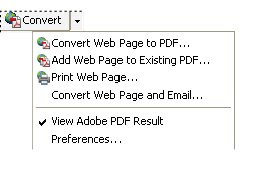 4. Choose "Convert Web Page to PDF.."
you should be all set to go!
We know IE can browse sites without requiring users to enter password becuase of IE's credential passthrough, Adobe, unlike most of MS office product, doesn't have such functionality. But we can use IE's PDF boolbar to achieve credential passthrough:
1.Browser IE to the desired secure site;
2. IE view->toolbar->adobe PDF;
3. “Convert” appears in the toolbar as follows:
 4. Choose "Convert Web Page to PDF.."
you should be all set to go!
Subscribe to:
Posts (Atom)

