Instead, go to Site Settings->Site Content Type Gallery ->select content type->Advanced Settings -> Edit Template:
Showing posts with label sharepoint 2007. Show all posts
Jun 16, 2011
Redesign an infopath template from sharepoint site
If you publish an infopath template directly to a sharepoint library, you can design (redesign) it later with InfoPath client, but what if you publish the template as a content type or as administrator approved form? you will NOT be able to do the same thing as direct publish by browsing sharepoint library.
access denied error with SPD workflow
Lately running into a problem when any user with "designer" permission level failed to save workflow from SPD with an error saying " Server Error: Access Deny". Further, users with designer permission can't manually start this workflow from browser with a similar access deny error. The workflow startup page is one of four files listed for each workflow in SPD, and it is missing from designer view:
Check out and check this file back in, the error goes away.
May 18, 2011
Change SharePoint Application Binding, easier than thought
Recently I need to install Fiddle on one of my test servers to trace down an authentication issue, the server has SSP hosting application running at 8888, which blocks Fiddler. So I want to see how difficult to move this application to a different port.
I know I have to change port number on IIS and also have to change AAM, but surprisingly that is all needs to be done. SSP picks up automatically its new hosting app and everything runs like a champion.
Mar 31, 2011
Browser-enabled InfoPath Form with web services
It is common for InfoPath Form to utilize web services as secondary data sources. Normally there is no problem if InfoPath forms are opened in a InfoPath Client application, but problems occur when InfoPath forms are opened in browser, i,e, using InfoPath Form Service.
For browser-enabled Infopath form, web services are called from sharepoint server, sometimes the network communication problem between sharepoint server and web service server can block services for browser-enabled forms, but could have no impact when InfoPath Client applications open the same form, or have no impact on web service configuration at design time.
There are 2 options to workaround brows-enabled Form with web services: one is to set form "Full Trust":
This option will require Administrator-approved publishing option.
and the other is to convert data sources into data connection:
This option will allow form trust at Domain level, and with other publishing options available, but this option will require "Cross-Domain Access" checked for InfoPath Service from Central Admin:
Mar 8, 2011
SharePoint 2007 List Event ItemAdding fire twice
when you cancel the event in ItemAdding Handler, like:
public override void ItemAdding(SPItemEventProperties properties)
{
SPUtility.SendEmail(properties.OpenWeb(), true, true, to, subject, body); properties.Cancel = true;
}
you will get 2 email messages.
Other senario that list events fire more than once, largely becuase the event handlers are registered more than once. Use SPM to find out, and write code to un-regisgter. http://blogs.msdn.com/b/ketaanhs/archive/2008/04/01/how-to-un-register-an-event-handler-on-a-list-sharepoint-2007-moss.aspx
public override void ItemAdding(SPItemEventProperties properties)
{
SPUtility.SendEmail(properties.OpenWeb(), true, true, to, subject, body); properties.Cancel = true;
}
you will get 2 email messages.
Other senario that list events fire more than once, largely becuase the event handlers are registered more than once. Use SPM to find out, and write code to un-regisgter. http://blogs.msdn.com/b/ketaanhs/archive/2008/04/01/how-to-un-register-an-event-handler-on-a-list-sharepoint-2007-moss.aspx
Feb 1, 2011
Beware of SPWeb.GetFolder(URL)
After a call to SPWeb.GetFolder(URL), you better check if it exists by spFolder.Exists(), since the GetFolder() call won't return error even if the folder doesn't exist. What is more, even if it doesn't exist, you can still get some properties (like spFolder.Url etc) out of it. But all of sudden, you get the following error when you try to get Item out of the folder object:
This seems to me a bug, but is documented in http://msdn.microsoft.com/en-us/library/ms461547.aspx
The object specified does not belong to a list. at Microsoft.SharePoint.SPWeb.GetItem(String strUrl, Boolean bFile, Boolean cacheRowsetAndId)
at Microsoft.SharePoint.SPFolder.get_Item()
This seems to me a bug, but is documented in http://msdn.microsoft.com/en-us/library/ms461547.aspx
If the folder does not exist, an SPFolder object is returned, but any attempt to access its properties throws a FileNotFoundException exception.
Sep 24, 2010
Thoughts on Installing Sharepoint with least privileges
Lately I have followed the "least privileges" rule while deploying SharePoint 2010 for a MCS customer. Immediately after core installation followed by a creation of BI site, I decide to apply June CU update first before provisioning the User Profile Sync service application. Without any second thought, I just kept using the same setup account to install CU. The setup account has only dbcreator and securityAdmin roles, based on "least privileges" rule. The result is very "surprising": each server's status is hanging with "upgrade available", and CU is not applied as it is indicated by Sharepoint version.
What is wrong? the setup account unfortunately doesn't have any access to sharepoint content database under least privileges, but which account should be used then? A farm account certainly has all accesses to every sharepoint database, but again by least privilege rule, it is not supposed to be a local admin, otherwise you get warnings from Sharepoint Health Analyzer. Actually, the farm account, as a service account, might not even be given the right to log on locally. So what is the workaround? the answer to this dilemma: break the least privilege rule by giving setup account a SA server role in the database, and then re-run the configuration wizard to fix the problem.
Jul 29, 2010
Performance Point Server in SharePoint 2007
The installation of PPS creates a site in IIS called PPSMonitoring which include webservice and preview sub directory. Webservice is called to connect datasource, and Preview is used to deploy and preview dashboards instead of having to deploy to sharepoint every time.
if you get the following error when working in Dashboard Designer:
That most likely means PPS Monitoring web service is not running (due to app pool id password expired in some cases). and also make sure the specific user has the read permission to web.config and other physical files or use "pass-through" option
if you get the following error when working in Dashboard Designer:
"Unable to connect to the specified server. Make sure the address is correct"or:
"the requested item cannot be found. Verify that it exists and that you have access permission"
That most likely means PPS Monitoring web service is not running (due to app pool id password expired in some cases). and also make sure the specific user has the read permission to web.config and other physical files or use "pass-through" option
PSMonitoringWebService App Pool id is used for Dashboard Designer to connect the datasource. PPSMonitoringPreview App pool id is used during preview dashboard, and Sharepoint application pool id is used to connect to datasource once dashboard is deployed on sharepoint site.
Those application pool ids need to have appropriate access to data source. They also need to have permissions to PPS Monitoring system database (BPMdeveloper role), but this role is normally granted during installation/configuration except for sharepoint application pool if it is different. see this for details. In case application pool ids change, you need to manually add it to this BPMdeveloper role. Otherwise you will get "unable to connect data source" error.
Jun 16, 2010
a misleading "Access Denied" error when joining a existing sharepoint farm
Lately I have tried to join a new Report Server to an existing sharepoint 2007 farm as it is required for SSRS in integrated mode, but the configuration wizard fails at the step 2, i,e, connecting to configuration database, and I got the following error from window event log:
As the error message indicates, all my thoughts are on the database connection, for that, I first check if the sql server is ping-able, and then the permission on config database, and then whether window firewall is open etc... everything is fine, I can even create a new farm with the same sql server, but I could not join!
At last, i found i have it is caused by different sharepoint versions: one with April 2010 CU and the other is just SP2. This is nothing to do with database. After installing the CU, the error disappears, and join is successful. I hope this can save me or someone else several frustrating hours next time.
Failed to connect to the configuration database.
An exception of type System.Security.SecurityException was thrown. Additional exception information: Access denied.
System.Security.SecurityException: Access denied.
at Microsoft.SharePoint.Administration.SPPersistedObject.Update()
at Microsoft.SharePoint.Administration.SPServer.Update()
at Microsoft.SharePoint.Administration.SPFarm.Join()
As the error message indicates, all my thoughts are on the database connection, for that, I first check if the sql server is ping-able, and then the permission on config database, and then whether window firewall is open etc... everything is fine, I can even create a new farm with the same sql server, but I could not join!
At last, i found i have it is caused by different sharepoint versions: one with April 2010 CU and the other is just SP2. This is nothing to do with database. After installing the CU, the error disappears, and join is successful. I hope this can save me or someone else several frustrating hours next time.
May 25, 2010
sharepoint anonymous users: what they can do?
When a web application is anonymous enabled, each site collection can define whether anonymous users can access whole site or just lists/libraries or nothing. Anonymous users will assume "limited access" permission role. This special permission role is not configurable, but it does have 2 flavors: with or without LockDown mode. The most significant difference is the lockdown mode takes away the following 2 permissions from anonymous users:
Anonymous users will be challenged or prompted when they try to access resources which are not granted by the "limited access" role. Anonymous users can access sharepoint resource only by server object model, not by web service (either asmx or wcf) regardless whether site is anonymous enabled or whether lockdown mode is turned on. The only workaround is for readonly web service as described in the following 2 posts:
exception: for readonly and SOAP version 1.1(asmx): modify SOAPAction Header:
http://mdasblog.wordpress.com/2010/03/18/allowing-anonymous-access-with-sharepoint-web-services-and-spservices/
http://weblogs.asp.net/jan/archive/2009/05/25/quot-the-security-validation-for-this-page-is-invalid-quot-when-calling-the-sharepoint-web-services.aspx
Otherwise web service call must carry a valid credential. However if web services doesn't involve any object model, anonymous users can call those kinds of web service even if those web services are hosted inside sharepoint.
WCF services add another level of security with security binding configurations for each endpoint. WCF endpoint security along with hosting IIS authentication setup together will determine if anonymous users can invoke WCF services. See here for details.
If the web service is custom web service and using sharepoint object model, the web service need to be in viti_bin, or sharepoint CAS policy need to change. As any web service with sharepoint object model involved, they are not open to anonymous users any way.
In sharepoint 2010, at web application level, there are 2 new policies: Users Policy and Anonymous Policy, which can deny individual uses or all anonymous user's access to an anonymous web application.
Anonymous users can't access to sharepoint application pages under _layouts folder as most sharepoint application pages inherit from LayoutPageBase which is a secure page, nevertheless some application pages inherit from UnsecuredLayoutPageBase such as searchresults.aspx, login.aspx etc, which are open to anonymous users.
- Site permissions: Use Remote Interfaces. It will prevent web service (SOAP), WebDav and SPD connection to sharepoint sites;
- List permissions: View Application Pages. It will prevent anonymous users from view list form pages such as allitems.aspx, edititem.aspx etc
Anonymous users will be challenged or prompted when they try to access resources which are not granted by the "limited access" role. Anonymous users can access sharepoint resource only by server object model, not by web service (either asmx or wcf) regardless whether site is anonymous enabled or whether lockdown mode is turned on. The only workaround is for readonly web service as described in the following 2 posts:
exception: for readonly and SOAP version 1.1(asmx): modify SOAPAction Header:
http://mdasblog.wordpress.com/2010/03/18/allowing-anonymous-access-with-sharepoint-web-services-and-spservices/
http://weblogs.asp.net/jan/archive/2009/05/25/quot-the-security-validation-for-this-page-is-invalid-quot-when-calling-the-sharepoint-web-services.aspx
Otherwise web service call must carry a valid credential. However if web services doesn't involve any object model, anonymous users can call those kinds of web service even if those web services are hosted inside sharepoint.
WCF services add another level of security with security binding configurations for each endpoint. WCF endpoint security along with hosting IIS authentication setup together will determine if anonymous users can invoke WCF services. See here for details.
If the web service is custom web service and using sharepoint object model, the web service need to be in viti_bin, or sharepoint CAS policy need to change. As any web service with sharepoint object model involved, they are not open to anonymous users any way.
In sharepoint 2010, at web application level, there are 2 new policies: Users Policy and Anonymous Policy, which can deny individual uses or all anonymous user's access to an anonymous web application.
Anonymous users can't access to sharepoint application pages under _layouts folder as most sharepoint application pages inherit from LayoutPageBase which is a secure page, nevertheless some application pages inherit from UnsecuredLayoutPageBase such as searchresults.aspx, login.aspx etc, which are open to anonymous users.
Apr 3, 2010
much improved RSS Viewer web part in SharePoint 2010
RSS Viewer web part in MOSS 2007 is very buggy when it is used to host private/authenticated feeds. In addition to the one related with AAM setting, another big problem is, it can't auto refresh private feeds (only refresh after IISRESET!). Also if you try to set up constrained delegation in order to host private feeds from a remote server, it will break for those feeds from its own server! ( the workaround is to add delegation to itself, isn't it ridiculous?)
The only problem I have seen with RSS Viewer web part in SharePoint 2010 beta2 is, when setting up delegation (in order to view feeds from a remote server), choose the option "Trust this user for delegation to any service (kerberos only)" won't work (same behavior in MOSS's RSS Viewer). You have to choose the option "Trust this user for delegation to specific services only", and then add remote services for delegation target:
References: great article by Spencer Harbar: Sharepoint 2010 and Kerberos
The only problem I have seen with RSS Viewer web part in SharePoint 2010 beta2 is, when setting up delegation (in order to view feeds from a remote server), choose the option "Trust this user for delegation to any service (kerberos only)" won't work (
Mar 19, 2010
Window Server, .Net Framwork and Visual Studio
Recently my coworker install Ajax Extension 1.0 on Window Server 2008 R2. As we know, Ajax 1.0 is an add-on only for .Net 2.0 framework, and Ajax support in .Net 3.5 is native. This installation doesn't make senses, however, the installation did fix issues for sharepoint content deployment. The story is, even though .Net Framework 3 is shipped, you still need to install it, otherwise, you only get .Net 2.0
As developer, most of us get .Net framework from the development tool we use: Visual Studio,
So it is important to know what .Net version on your deployment target server.
As a SharePoint developer, we know what .Net framework SharePoint is built on:
<sharepoint >
< system.web >
<compilation >
< assembly >
< add assembly="System.Core, Version=3.5.0.0, Culture=neutral, publicKeyToken = B77A5C561934E089" >
Running SharePoint 2007 on a Window 2008 server doesn't mean SharePoint can run .Net 3.5 features such as SilverLight, Ajax and LinQ etc. see this article for more details.
As developer, most of us get .Net framework from the development tool we use: Visual Studio,
So it is important to know what .Net version on your deployment target server.
As a SharePoint developer, we know what .Net framework SharePoint is built on:
- SharePoint 2010 .Net 3.5
- SharePoint 2007 .Net 2.0
- SharePoint 2003 .Net 1.0
<sharepoint >
< system.web >
<compilation >
< assembly >
< add assembly="System.Core, Version=3.5.0.0, Culture=neutral, publicKeyToken = B77A5C561934E089" >
Running SharePoint 2007 on a Window 2008 server doesn't mean SharePoint can run .Net 3.5 features such as SilverLight, Ajax and LinQ etc. see this article for more details.
Feb 16, 2010
Modify SharePoint Solution Package (WSP) without rebuilding
Recently a SharePoint group memeber asked how to modify a text file inside a wsp without knowing source files's folder structure (i.e, it can't simply rebuilt by wspbuilder). Initially i thought it can be done just by unzip and zip again wsp file. It turns out even though wsp can be extracted by winzip, it can't be zipped back (the resulting wsp can't be added).
The right and simple way to do this is to use winzip extract and then use Cab SDK (download here) command such as:
This works for both MOSS 2007 and SharePoint 2010 farm solution, but it doesn't work for SharePoint 2010 sandbox solution. I will update when I find a way to do it for sandbox solution as well (wait for 2010 RTM)
The right and simple way to do this is to use winzip extract and then use Cab SDK (download here) command such as:
cabarc -r -p -P winzip n bcs.wsp winzip\*.*
This works for both MOSS 2007 and SharePoint 2010 farm solution, but it doesn't work for SharePoint 2010 sandbox solution. I will update when I find a way to do it for sandbox solution as well (wait for 2010 RTM)
Feb 11, 2010
Colon a SharePoint web application
I was asked to colon a web application, essentially this is just to backup/restore content db. sounds very simple? but a couple very costly pitfalls:
First, if new web app resides in the same farm, the challenge is, each collection Id has to be unique.
Second, it is very tempting to take this shortcut: create a web application and then do content database backup/restore. This is an absolute failure path since SharePoint Config DB is left out totally.
The working path is:
First, if new web app resides in the same farm, the challenge is, each collection Id has to be unique.
- use stsadm addcontentdb to assign a different id, but as warned by MS, the site collection very likely becomes an orphan;
- use stsadm backup/restore for each individual site collection;
Second, it is very tempting to take this shortcut: create a web application and then do content database backup/restore. This is an absolute failure path since SharePoint Config DB is left out totally.
The working path is:
- Restore the content DB (if in the same SQL instance, file names need to be changed)
- creating a new web application in a different farm, use the restored db to replace the one randomly generated by SP
- after web application being created, use stsadm -o addcontentdb cmd line or UI to add the restored db, and then remove the one auto-generated by SP.
Dec 3, 2009
SharePoint Content Deployment
Recently I have deployed sharepoint content from 32 bit window 2003 to 64 bit window 2008, here are some pitfall I ran into:
<xs:attribute name="AllowAutomaticASPXPageIndexing" type="xs:boolean" use="optional" >
<xs:attribute name="ASPXPageIndexMode" type="xs:string" use="optional" > < xs:attribute name="NoCrawl" type="xs:boolean" use="optional" >
< xs:attribute name="CacheAllSchema" type="xs:boolean" use="optional" >
- Target SharePoint server has to be configred to accept "incoming content deployment jobs" and check "Do not require encryption" if SharePoint Central Admin site is not using SSL;
- Target SharePont site collection has to use blank template;
- Deploymentmanifest.xsd (under 12 hives\Template\xml on Target SharePoint Server) has to add the followings (this only requires for 32 to 64 bit mix)
<xs:attribute name="AllowAutomaticASPXPageIndexing" type="xs:boolean" use="optional" >
<xs:attribute name="ASPXPageIndexMode" type="xs:string" use="optional" > < xs:attribute name="NoCrawl" type="xs:boolean" use="optional" >
< xs:attribute name="CacheAllSchema" type="xs:boolean" use="optional" >
Nov 17, 2009
RSS Viewer web part bug
If you want to use RSS Viewer web part for private/authenticated feed, you need enable Sharepoint Kerberos authentication. Otherwise you get error: "The RSS webpart does not support authenticated feeds" even the feed from its own site.(update 03/31/2010:
When you view a private feed, you may also get the following error:
"An unexpected error occured processing your request. Check the logs for details and correct the problem."
It happens when you use a non-default zone URL for sharepoint site: (update 03/31/2010: this appears not to happen on sharepoint 2010 beta2)

With AAM setting like this:

It works if using the default zone URL:
(update 03/31/2010) Reference: SharePoint 2010 and Kerberos by Spence Harbar
- on window 2008, it can view authenticated feeds from its own site, but it is win2k8 only. on both window 2003 and window 2008 R2, it requires SPN registration (delegation not necessary) and Kerberos in order to view authenticated feeds;
- if both feeds and RSS Viewer on the same server, only consuming web application (RSS Viewer host) needs Kerberos even if feeds are from other web application with different application pool;(on window 2008, it only requires IIS kerberos setting, no SPN needed)
- the above apply for both moss and sharepoint 2010;
When you view a private feed, you may also get the following error:
"An unexpected error occured processing your request. Check the logs for details and correct the problem."
It happens when you use a non-default zone URL for sharepoint site: (update 03/31/2010: this appears not to happen on sharepoint 2010 beta2)

With AAM setting like this:

It works if using the default zone URL:
(update 03/31/2010) Reference: SharePoint 2010 and Kerberos by Spence Harbar
add custom sharepoint web service in VS 2008
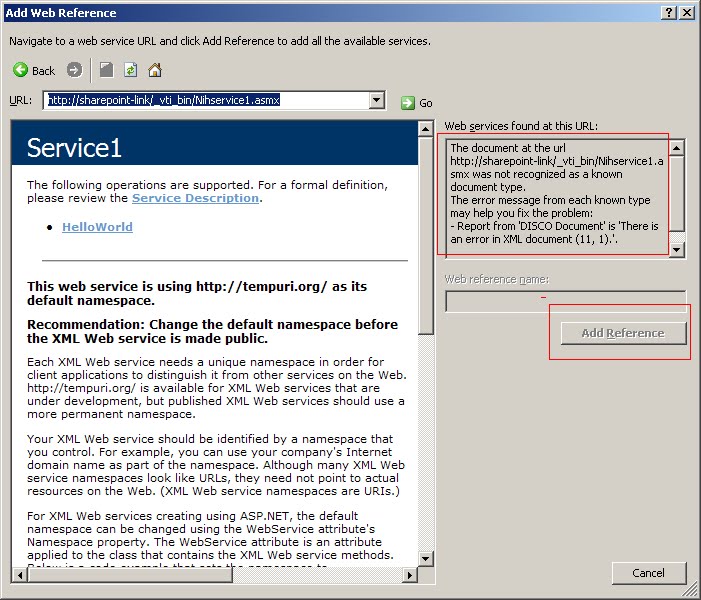
This article gives all you need to create a custom web serice in SharePoint 2007. But when adding a custom service in Visual Studio 2008, get the following error:

It turns out you have to append ?WSDL :
A custom sharepoint web service needs to be put in _vti_bin to be trusted. Otherwise either SharePoint trust level or CAS policy need to be modified.

It turns out you have to append ?WSDL :
A custom sharepoint web service needs to be put in _vti_bin to be trusted. Otherwise either SharePoint trust level or CAS policy need to be modified.
Sep 7, 2009
Activating Sharepoint Timer Job
The best pratice to create a custom sharepoint timer job is to create a feature with web application scope and to instantiate a SPJobDefinition there. This is becuase it is application pool id's credentail that is used during feature activation, and only central admin pool id which is farm account has sufficient privilege.
When activating from other web application whose pool id is not farm account (by best practice, it should not), you may see one or both errors as follow:
Workaround: assign application pool id as db_owner of sharepont config database
After that, you might get anohter error (if the app pool id is not sharepoint server local admin) when you try to activate (with permission on config database, you can now unactivate feature, but not activate)
Workaround: assign full control permission to application id for that folder or add app pool id into WSS_ADMIN_WPG group.
But the real solution is to activate timer job feature in the central admin, which means you need to create a feature of web application scope.
When activating from other web application whose pool id is not farm account (by best practice, it should not), you may see one or both errors as follow:
- In browser, "unknown error" and in window event log, "EXECUTE permission denied on object 'proc_putObject' "
Workaround: assign application pool id as db_owner of sharepont config database
After that, you might get anohter error (if the app pool id is not sharepoint server local admin) when you try to activate (with permission on config database, you can now unactivate feature, but not activate)
- In browser, "HTTP 403 error (someone saying 404 error), and in ULS log, "...Microsoft\SharePoint\Config\bd189eb6-92d0-4ca5-87b0-770f542e3f0a\cache.ini' is denied"
Workaround: assign full control permission to application id for that folder or add app pool id into WSS_ADMIN_WPG group.
But the real solution is to activate timer job feature in the central admin, which means you need to create a feature of web application scope.
Sep 3, 2009
SharePoint databases part 2
part 1 outlines sharepoint databases and database backup. This part will focuse on secrity: what sharepoint accounts have access to sharepoint databases and in what roles.
SharePoint_config database:
Central_Admin database:
Content database:
SSP (and SSP Search DB):
SharePoint_config database:
- install account is its dbo
- farm account (and local admin) in db_owner role
- application pool account in WSS_Content_ApplicationPoolid role
Central_Admin database:
- same as config except that local admin is not in db_owner role
Content database:
- farm account is dbo
- app pool account and ssp service account are in db_owner role
SSP (and SSP Search DB):
- same as content database, plus search service account is in db_owner
Server Roles:
- Install account has dbcreator fixed server role & securityadmin fixed server role.
- Farm account has the same fixed server role, but it is automatically configured.
- other service only has public server role.
Understanding those and sharepoint application pool id (see this) can help to solve a lot sharepoint database permission issues such as :EXECUTE permission denied on object 'proc_putObject' in event log tells that the application pool id doesn't have write permission on configure database.
Aug 10, 2009
core.js in sharepoint master pages
in sharepoint default.aspx file, core.js is loaded as deferred:
<sharepoint:scriptlink language="javascript" name="core.js" Defer="true" runat="server" / >
in layouts/application.aspx, it is loaded without deferred:
<sharepoint:scriptlink language="javascript" name="core.js" runat="server" >
The impact of this difference is, you can override javascript functions in application pages (layouts pages), but you can't do that to site pages.
<sharepoint:scriptlink language="javascript" name="core.js" Defer="true" runat="server" / >
in layouts/application.aspx, it is loaded without deferred:
<sharepoint:scriptlink language="javascript" name="core.js" runat="server" >
The impact of this difference is, you can override javascript functions in application pages (layouts pages), but you can't do that to site pages.
Subscribe to:
Posts (Atom)


