Showing posts with label Kerberos. Show all posts

May 20, 2011

configure ASP.NET impersonation authentication in IIS 7 and forward user credentials

If you just add  in  web.config aiming to configure impersonation for a IIS 7 web site, the site will be broken immediately with a HTTP 500 error.

The reason is that Application Pools in IIS 7  have  "Managed Pipeline Mode" defaulted as "Integrated", under which impersonation doesn't work. Changing from "Integrated" to "Classic" is the fix. If you check all application pools for sharepoint application, they are all set as "Classic".

Since IIS 7 use Kernel Mode for authentication, and if you are using server BIOS name as URL, you get Kerberos authentication for free (see this blog for details). Does this mean, with impersonation in place,  you can forward logon user's credential to next hop? for example, setting credential before calling web service such as:

svc.Credentials = System.Net.CredentialCache.DefaultCredentials; 
 
You still need delegation right for your service account (or machine account?) to make that hop happen. Otherwise you simply forward a empty credential to the web service, and if the web service is not anonymous, the call will fail.
 
 
In case of NTLM authentication, logon users' credential can not be forwarded by any means.

Oct 20, 2010

PowerPivot Data Refresh and Excel Refresh

PowerPivot Workbook has 2 kinds of data sources, one is from its Pivot table cache, and the other is from PowerPivot Analysis Cubs. Then what  about Data Refresh? PowerPivot Data Refresh is to refresh Analysis Cubs from external data sources, and as part of this refresh process, the workbook is updated as well.

The credential used for data refresh can be: Unattended account, embedded window credential, or SSS


Notice, there is no window authentication listed above, which means the logon user credential is never used for data refresh. So obviously data in Analysis Service is not security trimmed.

Also notice, it is PowerPivot System Service which retrieves data refresh credential and then sends to Analysis Service, since both PowerPivot and Analysis Service are guaranteed running on the same server, Analysis Service can delegate this credential further to external datasource without need of kerberos delegation.

Not to confuse PowerPivot data refresh with Excel refresh. Excel refresh happens when users click slicer or manually do data refresh. The result is, its cached pivot table get refreshed from .abf file or AS cubs ultimately. PowerPivot functions as Excel data source in this case.

As both Excel Service and PowerPivot service are claim aware, it is claim token that flow from Excel to PowerPivot System service. From PowerPivot to Analysis Service which is not claim aware, it is window token that flows thanks to Claim to Window Token Service. But the most interesting thing is, PowerPivot use PowerPivot Service Application account, not logon user account to connect to Analysis Service:


This is why there is no need to configure security in PowerPivot Analysis Service, but the question is, what is the security enforcement at Analysis Service level even with the note "PowerPivot System Service immediately downgrade the connection"?

the answer is it doesn't need to be, since the data refresh is just to refresh data in AS cubs, and they don't need to be security trimmed. Excel Service will enforce security when it connects to AS Cubs to fetch data.

The follow-up question is, does Excel Service account need kerberos delegation to AS? The answer depends, if Excel Service and Power Pivot run on the same server as they should, there is no hop and Kerberos is not required, if Excel Service and Power Pivot run on different server, Excel Service account should be granted a delegation right to AS and logon users should have read access to AS Cubs if window authentication in Excel workbook is chosen.

Aug 11, 2010

some notes on BCS, ECT authentication mode and SSO

SharePoint Business Connectivity Service, just like Excel service, is to get external data source into sharepoint, but its logic authentication is quite different from Excel Services, and it doesn't use C2WTS:

External Content Types in SPD have 4 types of authentications for external data source :
  • User's Identity
  • BDC Identity
  • Impersonate Window Identity
  • Impersonate Custom Identity
User's Identity is to use logon window user's identity to connect to external data, which requires Kerberos implemented for both sharepoint and external data source (no configuration needed for BCS application)

BDC Identity is to use Sharepoint application pool id to connect to external data ( it was called revertToSelf). no security enforcement.

Both Impersonate Window Identity and Impersonate Custom Identity are to use SSO:


The difference between those two is, the first one requires SSO application using window account and the second one use sql account as shown below:
To use ECT object, users need an execute permission which can only be set from central admin:

Aug 2, 2010

SharePoint 2010 Excel Services Authentication Mode

One of properties in any workbook's connection is called "Excel Services Authentication". Its default choice is "Windows Authentication"

As stated in its description, this mode is supposed to use logon user's credential to connect to external data source. However this happens only if kerberos and delegation are configured correctly for both SharePoint and Excel Services, if not, excel services connect to external data source anonymously, which nevertheless doesn;t necessarily mean the failure of Excel Services data accessing. Why? since it largely depends on the connection definition in  your connection file:

  • if sql authentication is used and sql account/password are available in the connection string, excel service can still fetch external data.That explains why excel services can work OOB without any kerberos configuration even if its authentication is set as "window authentication".
  • if window authention is used in the connection string, and external data is not allowed anonymous access, you will get access deny error
  • Alternatively SSO can be used such as ProjectServer sample connection all use SSS ID called "ProjectServerApplication"
  • the "None" option requries unattended service account setup. by default, Excel service application doesn't create unattended account for itself.

To use logon user's credential to access external data source by using Excel Service,  there are 3 subsystems involved: sharepoint, Excel Service, and external Data source.

 Normally for scenario like that, all of 3 subsystems are required to be kerberos enabled (registering SPNs) and both sharepoint and Excel Service should have delegation rights. However, SharePoinit 2010 Excel Service is claim aware, i.e, it is claim that will be used for communication, thus no kerberos or SPN for Excel service is needed, nor SharePoint WFE service account (application pool id) needs the delegate right to Excel Services.

It is C2WTS that will take initial client kerberos token to external data sources. In order for that to happen, the following 2 accounts need to have delegation right to external datasoure:
  • service account running Excel Services Application. Find the application pool id from IIS:
      Update: actually it is easier to find it from Central Admin.
  • service account running C2WTS (which is a window service), or, computer account where C2WTS is running if "local system" instead of a domain account is used to run C2WTS
when configuring delegation, make sure use constrained delegation and choose "Use any authentication protocol" as shown below:


OOB SharePoint 2010 use "local system" to run C2WTS, but it is considered as the best practices to replace with a domain account. That will need some extra configurations:
  • register a trivial SPN for this domain service account (to trigger "delegation" option)
  • add to local admin group (need to reboot server)
  • In local security policy (secpol.msc) under user rights assignment give the service account the following permissions: 
          1.  Act as part of the operating system
          2. Impersonate a client after authentication
          3. Log on as a service 
  •  add this domain account into c2wtshost.exe.config as "allowedCallers"
  • add this domain account as sharepoint managed account and change c2tws service account from sharepoint central administration site
  • re-start the C2WTS service. for details see this white paper

Jul 9, 2010

IIS 7 Kernel Mode Authentication, Kerberos and DNS Alias (CNAME)

The main idea of IIS 7 Kernel Mode Authentication is to allow HTTP.sys to handle authentication, which means the computer account running HTTP.sys (not application pool account)  will be used during authentication negotiation (see this post for negotiation details).  If site URL is constructed from server name, kerberos will work automatically regardless of app pool account, since Host/servername is registered when servers join domain. If site URL is not constructed from server name, negotiation will choose NTLM unless SPN is registered correctly with the server computer account. If SPN is register by mistatke with any other account, the negotiation chooses Kerberos, but authentication can never go through.


This is a huge improvment over IIS 6.0 with its infamous 401.1 deny issue when site URL is constructed from NetBIOS and IIS pool account is a domain account. 

CNAME is generally considered not good for kerberos (particulary for IIS 6), since the kerberos client is  not to ask SPN with CNAME. For instance, if intranet.company.com is an alias to server1.company.com, the client is going to ask KDC for http/server1.company.com, not http/intranet.company.com. This doesn't necessarily mean CNAME will break kerberos: in case of kernel mode, CNAME actually make kerberos work without the need to registering any SPN (in contrast, if it is an "A" record in DNS, SPN, http/intranet.company.com, will have  to be registered to the server machine account)

Does this mean Kernel Mode is a silver bullet for kerberos? No, kernel mode won;t work for Load Balance situation with multiple WFEs: it is impossible to register the same SPN for more than 1 server machine account.

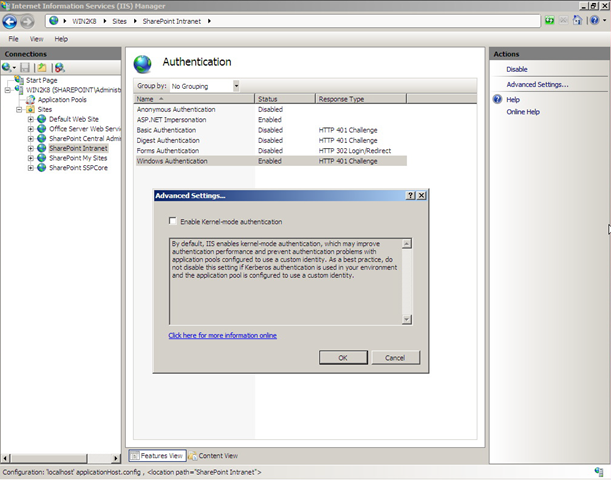
So for system designed to be multiple server farm such as SharePoint, Kernel Model has to be unchecked in order to configure Kerberos.

As best practice, for multiple server system, turning off Kernel Mode and then handling authentication the same way as IIS 6. For single server, don't truning Kernel Mode off (instead registering SPN correctly when needed to configure Kerberos). If site URL is server name, truning off Kernel Mode will result in authenticatin fail. See this http://support.microsoft.com/kb/871179 for details.

Note: even though Authentication works, it doesn't mean delegation work as well. computer account is NOT granted delegation right by default.


Even though the kernel mode in IIS as well as CNAME record in DNS make debugging kerberos very difficult, but the basic rules still stand:
  • if kerberos client won't be able to get the SPN either because SPN is not registered or is duplicated, the negotiation falls back to NTLM.
  • if Kerberos client can get the SPN, negotiation ends with Kerberos (see negotiation process here)
    • If the SPN is registered to a wrong account, A SPN must be registered to a correct account: either server computer account (in case of kernel mode) or application pool domain account. If it is registered to a different account, the kerberos authentication will fail, normally you get prompted indefinitely and can nerve get in.
    • If the SPN is registered to the right account, either server computer account (in case of kernel mode) or application pool domain account, authentication succeed then.

Jun 3, 2010

Enable Kerberos authentication for SSRS 2008

Starting from SQL 2008, IIS is elminated from Reporting Service. RS web service authenitcation mode is defined in   rereportserver.config located in C:\Program Files\Microsoft SQL Server\MSRS10.MSSQLSERVER\Reporting Service\Report Server\

If SSRS is running under localsystem account, Kerberos is enabled by default, if SSRS is running under a domain account, NTLM is enabled by default. In that case, to enable kerberos you first need to make the follwoing modification:

<authenticationtypes>
< rswindowsnegotiate >
< /authenticationtypes >

Notice: Use rswindowsnegotiate, DON'T Use rswindowKerberos, otherwise the RS service will immediately become non-accsible.


After that, you need to register SPN for SSRS servic account in Domain Controller, and also grant Delegation right for this account ( if it is localsystem account, grant the server computer delegation right instead)

Now the RS service is Kerberos enabled, but in order to use "Window Authentication (Integrated)" in data source configuratoin, the user database must be kerberos enabled too:


 To do that, you need to register SPN for sql service account running at user sql server, but delegation for this account is NOT necessary as it is the last hop in the chain.

You can certainly don't choose "Window Authentication", but  only the window authentication can give you  security trimmed reports, while other option can't not.

At this point, you should be able to view a report from RS web serive, but if you view reports from Sharepoint document library or Report Viewer web part,  you may get a 401 error
The reuest failed with HTTP status 401: Unauthorized
In order to make it work from SharePoint, SharePoint web applications have to be Kerberos enabled, and "window authentication" is selected in the setting of "Reporting Services Integration"

Apr 25, 2010

What happen behind screen for HTTP authentication, Kerberos or NTLM?

It is well known that during client-server authentication negotiation if clients send Kerberos token, kerberos will be adopted, otherwise authentication will fall back to NTLM. But from where clients get kerberos token, and how NTLM is chosen as a secondary choice? With helps from WireShark, I have found answers for those questions:

If server IIS is set up as "Negotiate, NTLM", on the first session, client first attempt to make anonymous HTTP request (without credential), server responds with 401 deny. After ACK,client makes a request to its KDC or Domain Controller for service token. One of the followings can happen then:
  • if KDC respond back with a service token, 
    • client will cache this token for subsequent sessions before its expiry time (10 hours by default)

    • client will make another HTTP request with service token.
    • if the token is accepted by server, server send back 200, connection is established
    • if the token is invalid, server deny again with 401 (if client is IE, IE will pop up a window for password, authentication reach an impasse)
  • if KDC respond back with an KRB error( for example, SPN is not found), client will send NTLM negotiation to server,
    •  server respond with NTLM challenge back to client
    • client make HTTP request with NTLM token
  • if KDC respond back with a kerberos account token (like krbTGT, not requested service token), that means this KDC can't find the requested service token, instead it designates a subdomain KDC
    • with this subdomin TGT token, client can makes requests to sub domain KDC for the same  service token
    • negotiation continue then
On subsequent session, since client already has token cache, it won't ask for KDC again until the token expires. This is why kerberos is considered not only secure, but also efficient.
 
At first, clients use a special TGT token to make requests to its KDC for service token. Clients get this special TGT token at login time. This TGT token also has a expiry time, and on Window 2008 Domain, it is automatically renews 30 minutes before expiry time. In a rare case (UPDATE: this case only happens to some xp sp2, sp3 has fixed this problem), with client kerberos cache corrupted, clients just send NTLM directly without even querying KDC for kerberos token. As a workaround, loging off/on or reboot client computer can solve this problem.

Apr 3, 2010

much improved RSS Viewer web part in SharePoint 2010

RSS Viewer web part in MOSS 2007 is very buggy when it is used to host private/authenticated feeds. In addition to the one related with AAM setting, another big problem is, it can't auto refresh private feeds (only refresh after IISRESET!). Also if you try to set up constrained delegation in order to host private feeds from a remote server, it will break for those feeds from its own server! ( the workaround is to add delegation to itself, isn't it ridiculous?)

The only problem I have seen with RSS Viewer web part in SharePoint 2010 beta2 is, when setting up delegation (in order to view feeds from a remote server), choose the option "Trust this user for delegation to any service (kerberos only)" won't work (same behavior in MOSS's RSS Viewer). You have to choose the option "Trust this user for delegation to specific services only", and then add remote services for delegation target:


References: great article by Spencer Harbar: Sharepoint 2010 and Kerberos

Nov 17, 2009

RSS Viewer web part bug

If you want to use RSS Viewer web part for private/authenticated feed, you need enable Sharepoint Kerberos authentication. Otherwise you get error: "The RSS webpart does not support authenticated feeds" even the feed from its own site.(update 03/31/2010:
  • on window 2008, it can view authenticated feeds from its own site, but it is win2k8 only. on both window 2003 and window 2008 R2, it requires SPN registration (delegation not necessary) and Kerberos in order to view authenticated feeds;
  • if both feeds and RSS Viewer on the same server, only consuming web application (RSS Viewer host) needs Kerberos even if feeds are from other web application with different application pool;(on window 2008, it only requires IIS kerberos setting, no SPN needed)
  • the above apply for both moss and sharepoint 2010;

When you view a private feed, you may also get the following error:

"An unexpected error occured processing your request. Check the logs for details and correct the problem."


It happens when you use a non-default zone URL for sharepoint site: (update 03/31/2010: this appears not to happen on sharepoint 2010 beta2)


With AAM setting like this:


It works if using the default zone URL:
(update 03/31/2010) Reference: SharePoint 2010 and Kerberos by Spence Harbar

IIS 7 Kerberos authentication for SharePoint

IIS 7 has a new feature called Kernel Mode Authentication, it can be found off "Advance Settings.."

In order for SharePoint to use Kerberos authentication, it has to be disabled: (update 04/01/2010: sharepoint 2010 disable this by default!!)


This is necessary because Kernel Mode can't work with multi-server sysem where you can't register same SPN to multiple server accounts.

see here for IIS authentication negotiation process


NONONO In IIS 6, as long as NTAuthenticationProvider is set as "Negotiate, Kerberos", whether SPNs are registered or not, server granted Kerberos authentication. But IIS 7 seems to be of SPN awareness during negotiation regardless of Kernel Mode on or off: it only agree on Kerberos when the App Pool ID account has SPN registered, otherwise it falls back to NTLM.


Aug 13, 2009

HTTP authentication on redirect

I recently had a hard way understanding Http authentication particularly involving redirect. After googling and conversing with a good friend, Alan, here is the picture on what will happen when server A (or browser)makes a http request to server B which redirects to server C:

  • Server A: Request.Credentials = CredentialCache.DefaultCredentials Sent request to Sever B
  • Server B: returns 401 – List of login schemes supported From Secured web page
  • Server A: Sends Request + Request.Credentials (formatted according to the selected login scheme) to Server B
  • Server B: returns 302 – "Redirect to Server C"
  • Server A: Request sent again to Server C
  • Server C: return 401 – List of login methods supported From New secured web page
  • Server A: Request + Request.Credentials (formatted according to the selected login scheme) to Server C
  • Server C: returns 200 – Content From New secured web page

Why auth handshake always happen even if the credential is set? This is by design, because Httprequest clients have no idea what auth schema the remote server is using. You can avoid first auth handshake by manually setting HttpRequest's header, like: req.Headers.Add("Authorization", "basic " + base64); But this needs to be done every time even for same Uri-Pref. Generally allowing handshake and setting PreAuthentication=true is better. See this post for details.

When making HttpRequest, HttpRequest object need to have a CookierContainer, which will be used by HttpResponse to fill in. It doesn't do anything with authentication though.

Another thing related is, in case of impersonating, Kerberos (both authentication and delegation) is required in order to forward default credentials (double hoppings).

Jun 24, 2009

Sharepoint Kerberos, really?

when you change authentication type to Negotiate(Kerberos) in SharePoint central admin, all sharepoint do is to change NTAuthenticationProvider of sharepoint site in IIS to "Negotiate, NTML" from "NTLM". (how to find NTAuthenticationProvider value? see this post. If there are multiple WFEs in your farm, check each of them as I experienced a problem seeing the failure of setting this IIS meta data from SharePont Central Admin UI.).

What does that mean? is Kerberos guaranteed? not really. Kerberose will be selected only if clients support Kerberos (such as "intergrated window authentication" checked in IE), and  SPN is registered (which make sure Kerberos is selected) and registered correctly (which make sure authentication will not fail)
But how do you know for sure you have Kerberos functioning? I usually go to EvntView of server and in security log find event id = 540, and if you have logon type =3 and AuthenticationPackage = Kerberos. you are good to go.

Mar 23, 2009

Authentication process: Kerberos or NTLM? and delegations

I ever post on how to register SPN. SPN is pretty much all needed for Kerberos authentication. The common misunderstanding is, authentication first try Kerberos, and if it fails, then try NTLM. Kerberos fallback to NTLM is referring selection process,not authentication itself. For example, when a client is trying to access server, NTLM will be selected if:
  • client such as IE has "Integrated window Authentication" unchecked (even if server IIS have NTAuthenticationProvider paramenter set to "Negotiate, NTLM": NTLM failback);
  • or server IIS have NTAuthenticationProvider paramenter set to "NTLM" (even if IE has "integrated window Authentication" enabled)
  • or SPN is not found from KDC
IIS 5 has default setting as "Negotiate, NTLM", in IIS 6 NTAuthenticationProvider paramenter is not set, but IIS 6 use "Negotiate, NTLM" as default just like IIS 5.

If both client and server support Kerberos (ie, server IIS has "Negotiate,NTLM" and IE support "Integrated window Authentication") kerberos will be selected.Negation starts: if client can get a ticket (SPN), it will send kerberos ticket, otherwise client will ask to use NTLMssp for authencation. if server doesn't have SPN, If client sends a wrong ticket, server will keep chanllenging client, and the result is: the authentication fail: server pop for password, but fail on any credentials. The authentication process can't fallback to NTLM at this point.

One of common cases that client could get wrong tickets is, the request uses Netbios name such as http://servername/, http/servername is not registered, but Host/servername always exists. The result is client keep sending ticket for HOST/servername while server expect HTTP/servername ticket.

Now it comes why we need delegation? You need delegation when you want to forward logon user's credential to another system. your ASP web needs to access resources in other server (double hop issue). This can happen when you have custom code to connect to anther SQL server, or you try to retrieve BDC data(other option for BDC is SSO), or you need to use Excel Service to display data from SQL report.

First, how to get logon user's credential?

  • System.Net.CredentialCache.DefaultCredentials when impersonate=true
  • User.Identity.Name when it is not anonymous
Second, how to hop?

  •  trust the server account (whatever it is, i.e, application pool, ssp service accout or mySite account etc) for delegation;
  • grant authenticated user (rather than service accounts) an access to target server/data.

Need to turst Computer Account for delegation? No, but only when your service is running under network service, local service or local system. When configuring computer account for delegation, 1) registering specific service (option 3) rather than all service (option 2), see here for insturction; 2)reboot server to make it effective.
Remember delegation has both timing and location constrains.

here is the checklist for kerberos delegation

Mar 21, 2009

SharePoint Kerberos: How to register SPN

To enable Kerberos authentication for sharepoint, the first step is to register SPN for differernt serveice accout.

1. SQl service account

it should be in the following format:

setspn -A MSSQLSvc/mySqlhost.myComany.com:1433 accountname
or
setspn -A MSSQLSvc/mySqlhost.myComany.com:MOSSInstance accountname

After that you can verify the kerberos by running the following query:

select auth_scheme from sys.dm_exec_connections where session_id=@@spid

note: you have to remotely connect to your SQL server, otherwise if you run SQL Studio inside the SQL server as I normally did, the above query always returns NTLM

2 web application pool account:
Assuming you have 2 web applications, one is at 80 and the other is at 8888.The best practice is to register in the format of:

HTTP/NetbiosName.domain
HTTp/NetbiosName
HTTP/NetbiosName.domain:8888
Http/NetbiosName:8888

if a FQDN is used in place of Netbios, make sure FQDN is a A record in DNS, not a CNAME. CNAME will be translated into a different FQDN. How to find the type?

NSLookup
>Set type=A (or CNAME)
> your FQDN

note: do NOT append append default 80, it will break if browser strips off 80, and also the bonus is it can make IE6 which doesn't append port number work without hotfix.
for eaxmple, if a request http://mysharepoint.domain.com:8888/ is made from IE 6.0, IE 6 will compose SPN as http/mySharePoint.myCompany.com which happens to match the one registered. It can fail if HTTP/mySharePoint.myCompany.com:80 is registered instead. If the same request is made from IE7, the SPN will be http/mySharePoint.myCompany.com:8888, and that is why we need the second format.

Beaware though, after registering Http\NetBiosName, it will overtake Host\NetBiosName which can cause Http 401.1 error as described in this post.

3. SSP service account
Don't even bother to register SPN in the format of HTTP/. It won't work. You have to install Infrastructure Update or CU which includes IP,and then use the new custom format:
MSSP/mySharepint.myCompany.com:56737/mySSP
MSSP/mySharepint.myCompany.com:56738/mySSP

Assuming SSP name is mySSP. read more here

4. Farm Admin and My Site serveice accounts
You can register them either using header or port number to avoid duplicates. It really should not matter, but normally people use port for Farm Admin, and use header for MySite.

Note: if any service account is using newbiosname account(Network Service, Local Service and Local System), you don't have to set SPN for them, since they already have a SPN (HOST/netbioname) by default.

with SPN registration done, you can verify kerberos authentication from the event logs. I will cover delegation in another post.

This post is based on IIS 6.0 for ISS 7 please read here.

Mar 19, 2009

Sharepoint Application Pool ID Account

SharePoint always impersonate authentication users in web.config by this entry: <entity impersonate="true" /> and it also has a Application Pool Account. What does this account do?


  1. In case Kerberos is used, this is the account that clients(such as IE) try to communicate with. This is why this account has be registered with a SPN for Kerberos authentication;
  2. In case you have custom code which need to hop to another server (SQL, File or any web service server), this account will forward login user credential(ticket in kerberos term) to the other server. This is why this account needs to be trusted for delegation;

  3. This is the account that sharepoint use to connect its own Content Database, which I bet is through a call RunWithElevatedPrivelege.

A couple other things I learn about web application pool account:

if you try to create an application from directly from IIS, you have to run:

ASPNET_regiis.exe -ga domain\pollIdAccount

if you use NetWork Service as pool id in window server 2k, you have to grant "Act as part of the operating system" privilege for impersonation to work. This is not necessary in Server 2003.

All application pool id should be in the IIS_WPG group which grant most permission they need. See here for a full list permission IIS built-in accounts have.

double hop issue and sharepoint sql communication

double hop big picture: IE browser--->Web Front End----->SQL (0r any 0ther server)

The double hop issue is all about passing window security token, so if you use SQL connection string, you don't have this annonying problem; or if
your ASP Web uses trusted subsystem (instead of impersonation which is configured in the web.config: < identity impersonate="“true”/ >). In the case of trusted system, it is the web application pool account who hops (only 1) to another server.

One of my colleagues responded this by asking, "why sharepoint doesn't have double hop issue when its WFE connects to its SQL database?"

Well this is the question I don't know the answer to. We all know kerberos is not required for sharepoint, impersonate is the default setting in sharepoint web.config, and window authentication in SQL is default too. so I go to google, no found a direct answer though, the closest one is:

< identity impersonate = “true” username=”Domain\UserName” password=”pword” / > can fix the problem.

I went back to my sharepiont web.config, of course, I didn't see it. But it does shed light. If impersonation in web.config can fix this problem, then impersonation in code should have done the same thing. In Sharepoint, RunWithElevatedPrivilege is designed for network calls: this little guy impersonates Application Pool Account, and this account always has SQL access.

I hope this bold assertion can trigger some interests on how sharepoint intra-farm communication work and someone can either confirm or correct it.