Feb 26, 2010

ScriptManager & Scripts from CDN such as AJAX Library

With roll out of ASP .Net AJAX Library, adding ajax capabilities in scripts is nothing but a link to CDN:


<script src="http://ajax.microsoft.com/ajax/beta/0911/Start.debug.js" type="text/javascript" > </script >

It will load all scripts needed for ajax development regardless of .Net Framework. However if asp:ScriptManager is also used, it will load script from framework. That will cause some visioning problems, and it is the case for sharepoint pages(this seemingly only happens if usng dataview control). SharePoint 2010 master page has ScriptManager embedded and is used by both site pages and application pages . As currently in beta, the workaround is to locally include MicrosoftAjax.js (see here for details).

Another cool thing about ScriptManage or ScripManagerProxy is its asp:serviceReference, it will inject a proxy script class on fly to allow client script to call backend ajax enabled WCF service.


Feb 16, 2010

Modify SharePoint Solution Package (WSP) without rebuilding

Recently a SharePoint group memeber asked how to modify a text file inside a wsp without knowing source files's folder structure (i.e, it can't simply rebuilt by wspbuilder). Initially i thought it can be done just by unzip and zip again wsp file. It turns out even though wsp can be extracted by winzip, it can't be zipped back (the resulting wsp can't be added).

The right and simple way to do this is to use winzip extract and then use Cab SDK (download here) command such as:
cabarc -r -p -P winzip n bcs.wsp winzip\*.*

This works for both MOSS 2007 and SharePoint 2010 farm solution, but it doesn't work for SharePoint 2010 sandbox solution. I will update when I find a way to do it for sandbox solution as well (wait for 2010 RTM)

Feb 14, 2010

SharePoint BCS Entity Names Mapping

The high level of BCS structure consisits of one Entity Service, which is exposed public as External Content type wth CRUD methods:


and one in-memory object class which functionsas an interface between BCS and its backend datasource:


Those two are linked by object's type Name:


reference: http://www.screencast.com/users/jthake/folders/SharePointDevWiki.com%20Screencast/media/10d81c1f-2bbf-417f-a307-1e88933b2864
http://weblogs.asp.net/scottgu/archive/2007/05/19/using-linq-to-sql-part-1.aspx
http://blogs.msdn.com/steve_fox/archive/2009/12/26/sharepoint-2010-development-using-bcs.aspx

Programming LINQ in VStudio 2010

  • LINQ to sql class
Programming LINQ to SQL in VStuido 2010 is as simple as step 1, 2, 3:
Step 1: launch VStudio 2010 to create an empty SharePoint Project:


Step 2: add a new item and choose LINQ to SQL Classes. Name it AWEmployee.dbml

Step 3: launch Server Explorer to drag Employee tables into design surface. In AWEmpolyee.designer.cs, you will find a class named as AWEmployeeDataContext.

  • LINQ to SharePoint
Just as SharePoint lists can now be displayed in VStudio 2010's Server Explorer, LINQ to SharePoint is another indication that MS start to treat SharePoint as a datasource. LINQ to SharePoint is not as mature as LINQ to SQL nevertheless. Currently it needs a manual process(as compared to the VS build-in entity framework for sql) , but fairly simple, to implement it:

Step 1 use SPMetal utility to generate a datacontext or entity class, for eaxmple: SPMETAL /web:http://sp2010/ /namespace:sp2010 /code: EntityClasses.cs

Step 2: the resulting source file defines a datacontext class which in turn defines an inner class for each individual SharePoint list (update 04/19/2010: or using parameters tag to define what you need to generate: /paramters:parameters.xml, see here for details) Add this file into VStudio project;

Step 3: Start query SharePoint List data by using LINQ query such as:
var query= from c in EntityClassesDataContext.Contacts where !c.ListName.Equal(""); orderby c.FirstName select c;
The advantage of using LINQ is, they are all strongly typed, and you get all intellisense.

Reference:
http://weblogs.asp.net/scottgu/archive/2007/05/19/using-linq-to-sql-part-1.aspx

Feb 11, 2010

Colon a SharePoint web application

I was asked to colon a web application, essentially this is just to backup/restore content db. sounds very simple? but a couple very costly pitfalls:

First, if new web app resides in the same farm, the challenge is, each collection Id has to be unique.
  • use stsadm addcontentdb to assign a different id, but as warned by MS, the site collection very likely becomes an orphan;
  • use stsadm backup/restore for each individual site collection;

Second, it is very tempting to take this shortcut: create a web application and then do content database backup/restore. This is an absolute failure path since SharePoint Config DB is left out totally.

The working path is:
  • Restore the content DB (if in the same SQL instance, file names need to be changed)
  • creating a new web application in a different farm, use the restored db to replace the one randomly generated by SP
or
  • after web application being created, use stsadm -o addcontentdb cmd line or UI to add the restored db, and then remove the one auto-generated by SP.
whether stsadm or UI, the credential needs to have access to the database. In case of UI, it is farm account(running central admin pool) and of course it is logon user account for stsadm. SharePoint will grant all other pool ids (such as application portal pool id) for the database access.

Jan 29, 2010

New SPD, Old Story with Data View

When creating Data View Web Part to connect with external data source, the following is the most infamous error you might get:

"The server returned a non-specific error when trying to get data from the data source. Check the format and content of your query and try again. If the problem persists, contact the server administrator"

Karine Bosch's Blog is the best to describe the root of this problem. Even though it was written for last version SPD, it still works for SPD 2010 with its second solution (only): use stored procedure.


a small side note, you can always see details of each Data Sources in _catalogs/fpdataSources/ folder. Some people said it is the way to work around connections to non-sql DB. Also, using window connection to SQL is not allowed for a good reason:it will be treated as double hop.

Jan 27, 2010

Using SharePoint PowerShell with intellisense

With thousands of cmdlets in SharePoint PowerShell, it is almost impracticable to use PowerShell without intellisense, for this reason, I posted the question on how to get intellisense for SharePoint PowerShell on Twitter, LinkedIn SP groups, MindSharp Mailing list, but didn't get response back. Turns out it is not that difficult, but in case someone needs a quick reference, here is the things you need to do:


First Download Window PowerShell V2.o to install PowerShell ISE (UPDATE:  ISE is installed in  window 2k8 R2, just need to activate as feature You will find it in All Programs -> Accessories ->Windows PowerShell)


Follow this post to load SharePoint snap-in into Window PowerShell ISE

Use intellisense by entering Tab key


One twist is, after using index, such as Lists["shared documents"], intellisense stop working, as a workaround, $list=$siteCollection.RootWeb.Lists["shared documents"], intellisense will work after $list.

Jan 21, 2010

Security in SharePoint Client Object Model

Available authentication types for managed .net client OM include:
  • Anonymous
    web applications need to be anonymous and Client OM permission requirement need to be unchecked as well:

    Even so, some operation like list.getitems(query) are blocked for undocumented reasons.
  • Default (Window Authentication)
  • By default, both .Net Client OM and Silverlight Client OM use window authentication, and credentials are passed through, i.e, sharepoint will authenticate the user who is running client applications.
      For web client application, when debugging in VStudio (F5), it is account running VStudio that will be passed, but for IIS sites, it is either App Pool ID (by default, no impersonation) or user login in account( when impersonation enabled) or anonymous accout (when anonymous enabled)
    • FormsAuthentication


    Addition security restriction:


    • ECMAScript Client OM can only access SharePoint data for current site, no cross site scripting allowed (no place in ECMA OM you can pass credential ). That means ECMAScript Client OM can only be used in SharePoint context, such as application page, web part, and dialogue.
    • Silverlight Client OM can only access resource from the same domain unless explicitly defining clientaccsspolicy.xml.

    Jan 17, 2010

    Load CDN hosted JQuery

    Since loading JQuery libraries from Content Delivery Network (CDN) has many advantages over hosting locally, I adopt this approach today by using script tag as:
    <script src="http://ajax.microsoft.com/ajax/jquery/jquery-1.3.2.js" type="text/javascript" > </script >

    I didn't expect any problem in doing that, but to my surprise, I kept getting "object expected" error on VStudio debugger. I tried with Google CDN, same error.

    The error indicates that JQuery is not loaded, but what causes it? It turns out this IE setting is the reason, somehow "Active Script" is disabled in my Win2k8 Web(SharePoint 2010) Server:


    Don't believe this could be a common case, but it proves CDN hosted JQuery relies on browser settings, and can fail. So the best practice is to always provide a failover to local JQuery libraries.

    Jan 11, 2010

    debugging SharePoint Silverlight Client OM code

    I have created a Silverlight application in VStudio 2010 (Beta 2) and wired it to sharepoint by using Silverlight Client Object Model. With F5 debugging, the code in ClientRequestEventHandler (OnSuccess) can't be hit:

    ctx.ExecuteQueryAsync(OnSuccess, onFail);

    However, if I put the .xap file in sharepoint _layouts folder, and link it to sharepoint OOB silverlight webpart, the code in the eventHandler are executed well. Even though that doesn't help to debug the silverlight application, it does give me a clue why running from VStudio doesn't work with SharePoint Client OM.

    Silverlight, as a client technology, has limitations on crossing domain access. With sharepoint lives in http://localhost/, and Silverlight test web lives in http://localhost:randomPort , that is treated as crossing domain access. To verify this, under sharepoint iis root path, i create a clientaccesspolicy.xml file. I can then debug into the EventHandler Callback code with VStudio F5. Works like a charm!

    Another anonymity is, when hosting silverlight app by using OOB Silverligh webpart, after updating .xap file, you have to also delete the browser's cookie to see the refresh.

    Jan 6, 2010

    SharePoint 2010 Reusable Workflow

    SharePoint 2010 (beta 2) has 3 kinds of workflow based on association:

    • List WorkFlow: associated with a list
    • Site WorkFlow : associated with a site
    • Reusable WorkFlow: associated with a content type or site column

    Since it is associated with either content type or site column, the Reusable Workflow accompany the same content type or site column across the whole site. It can't be associated directly with lists nevertheless. When Reusable WF is associated with a Site Column at design time, the site column need to be added into a content type first, and then the WF can be associated with that content type.

    Reusable WF can only be created in SPD (WF created in VStudio are always reusable), but it can be imported into VStudio as a list workflow and become reusable in a site collection scope. In Beta 2, Reusable WF automatically has a init form once it gets published, and it is not converted after Reusable WF get imported into VStudio. Te following problem occurs at workflow run time:

    " _layouts/... . /IniWekfllp. aspx " not found.

    Creating a Init From in VStudio can get around this problem.

    Jan 4, 2010

    SharePoint Workflow: onTaskChanged inside While Activity

    It is a common use to put onTaskChanged activity inside a While loop in a ShaerPoint Workflow, but unlike normal scenario where you can directly access its AfterProperties or BeforeProperties, both of them are null when onTaskChanged activity in a while loop. To get around this problem, OnTaskChanged activity needs to have both AfterProperties and BeforeProperties bind to either a field or property. This is not necessary though if onTaskChanged is not inside a While activity. I found this with Visual Studio 2010 beta 2, and I will verify it with new realease of VS 2010.

    Jan 1, 2010

    deploy sharepoint solution in Visual Studio 2010 (beta 2)

    When deploying a sharepoint solution from Visual Studio 2010 (beta 2) it fails in the step "recycle IIS Application Pool", and in the Event Viewer, there is an error saying:

    "SQL database login for 'sp2010_SharePoint_Config' on instance 'spsql' failed. Additional error information from SQL Server is included below."

    Most likely it is because the window login account IS a local Administrator account And it doesn't have permissions on either configuration db or content db. Unfortunately this is a quite common case though. VS only prompts to "run as Adminstrator" if window login account is NOT a local Administartor account. In other word, if user login as a non-adminstartor account, VS will prompt user to run VS "run as administrator", and user has a chance to choose a farm account or service account to run VS. But if user login as an account with local administartor privilege, VS won;t promot even if the login account doesn;t have sharepoint db permission.

    This also means you can't run VS as a local account to deploy sharepoint solutions unless SQL sits in the same box.

    Dec 15, 2009

    Create a sharpoint webpart in Visual Studio 2010

    Creating a web part becomes much easier with Visual Studio 2010 (beta 2). The structure is a dummy web part which simple load a user control:


    this.page.LoadControl(_ascxPath);


    In theory, a control can be added through

    • dynamically in CreateChildControls() of web part file

    • declarative in ascx file of user control

    • dynamically in Page_load() of user control's code behind

    adding a custom property is very easy now, all need to do is add the following 2 attributes to any property: [WebBrowsable(true), Personalizable(true) ]

    in .webpart, you can add default velues just as any other OOB properties

    As custom properties are open to injection of user script (good or bad), SharePoint 2010 introduce 2 new flags to enforce security at both webpart level and property level:

    SafeAgainstScript attribute in

    [RequiresDesignerPermission] attribute for web part's property

    see here for more details

    Dec 11, 2009

    Create a custom SharePoint application page and use ECMAScript ClientOM

    You can create a full-blown Application Page with a dll by using VS 2010, see this blog for details. Or you can follow the simple steps to create it without VStudio:

    * copy from any application page from layouts/

    * delete all contents in <asp:Content id="PlaceHolderMain" >

    *change the page inheritance to: Microsoft.SharePoint.WebControls.LayoutsPageBase

    *Find the buttons template section:

    <Template_Buttons>

    <asp:Button UseSubmitBehavior="false" runat="server"

    class="ms-ButtonHeightWidth" OnClick="BtnUpdateWeb_Click"

    Text="<%$Resources:wss,multipages_okbutton_text%>" id="BtnCreate"

    accesskey="<%$Resources:wss,okbutton_accesskey%>"/>

    </Template_Buttons>


    * Define OnClick function.
    <script runat="server">

    protected void BtnUpdateWeb_Click(object sender, EventArgs e) { ...}

    </script >

    *Note: The above template also defines both "OK" and "Cancel" buttons on the page.

    by now, it should be a functioning application page, and you can load ClientOM by adding the follwoing in any asp:content:


    <SharePoint:ScriptLink runat="server" Name="sp.js" OnDemand="true" Localizable="false" />


    Then you can use ClientOM in any javascrip such as:


    function retrieveWebSite() {

    var clientContext = new SP.ClientContext.get_current();

    this.oWebsite = clientContext.get_web();

    clientContext.load(this.oWebsite); //this is to make oWebSite available in client

    oWebSite........

    clientContext.executeQueryAsync(...)

    }

    Dec 3, 2009

    SharePoint Content Deployment

    Recently I have deployed sharepoint content from 32 bit window 2003 to 64 bit window 2008, here are some pitfall I ran into:

    • Target SharePoint server has to be configred to accept "incoming content deployment jobs" and check "Do not require encryption" if SharePoint Central Admin site is not using SSL;
    • Target SharePont site collection has to use blank template;
    • Deploymentmanifest.xsd (under 12 hives\Template\xml on Target SharePoint Server) has to add the followings (this only requires for 32 to 64 bit mix)


    <xs:attribute name="AllowAutomaticASPXPageIndexing" type="xs:boolean" use="optional" >
    <xs:attribute name="ASPXPageIndexMode" type="xs:string" use="optional" > < xs:attribute name="NoCrawl" type="xs:boolean" use="optional" >
    < xs:attribute name="CacheAllSchema" type="xs:boolean" use="optional" >

    Nov 17, 2009

    RSS Viewer web part bug

    If you want to use RSS Viewer web part for private/authenticated feed, you need enable Sharepoint Kerberos authentication. Otherwise you get error: "The RSS webpart does not support authenticated feeds" even the feed from its own site.(update 03/31/2010:
    • on window 2008, it can view authenticated feeds from its own site, but it is win2k8 only. on both window 2003 and window 2008 R2, it requires SPN registration (delegation not necessary) and Kerberos in order to view authenticated feeds;
    • if both feeds and RSS Viewer on the same server, only consuming web application (RSS Viewer host) needs Kerberos even if feeds are from other web application with different application pool;(on window 2008, it only requires IIS kerberos setting, no SPN needed)
    • the above apply for both moss and sharepoint 2010;

    When you view a private feed, you may also get the following error:

    "An unexpected error occured processing your request. Check the logs for details and correct the problem."


    It happens when you use a non-default zone URL for sharepoint site: (update 03/31/2010: this appears not to happen on sharepoint 2010 beta2)


    With AAM setting like this:


    It works if using the default zone URL:
    (update 03/31/2010) Reference: SharePoint 2010 and Kerberos by Spence Harbar

    IIS 7 Kerberos authentication for SharePoint

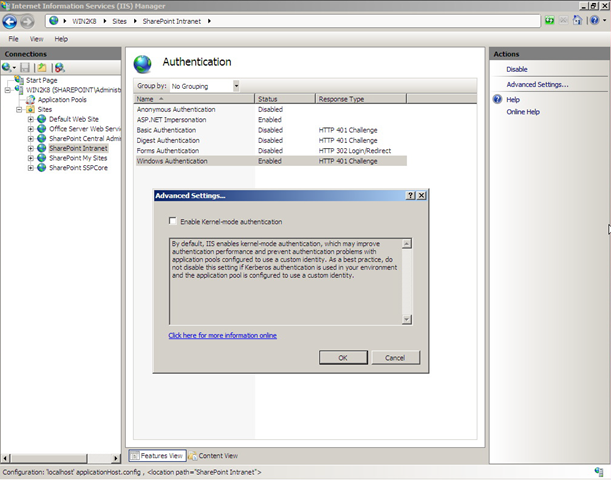
    IIS 7 has a new feature called Kernel Mode Authentication, it can be found off "Advance Settings.."

    In order for SharePoint to use Kerberos authentication, it has to be disabled: (update 04/01/2010: sharepoint 2010 disable this by default!!)


    This is necessary because Kernel Mode can't work with multi-server sysem where you can't register same SPN to multiple server accounts.

    see here for IIS authentication negotiation process


    NONONO In IIS 6, as long as NTAuthenticationProvider is set as "Negotiate, Kerberos", whether SPNs are registered or not, server granted Kerberos authentication. But IIS 7 seems to be of SPN awareness during negotiation regardless of Kernel Mode on or off: it only agree on Kerberos when the App Pool ID account has SPN registered, otherwise it falls back to NTLM.


    add custom sharepoint web service in VS 2008

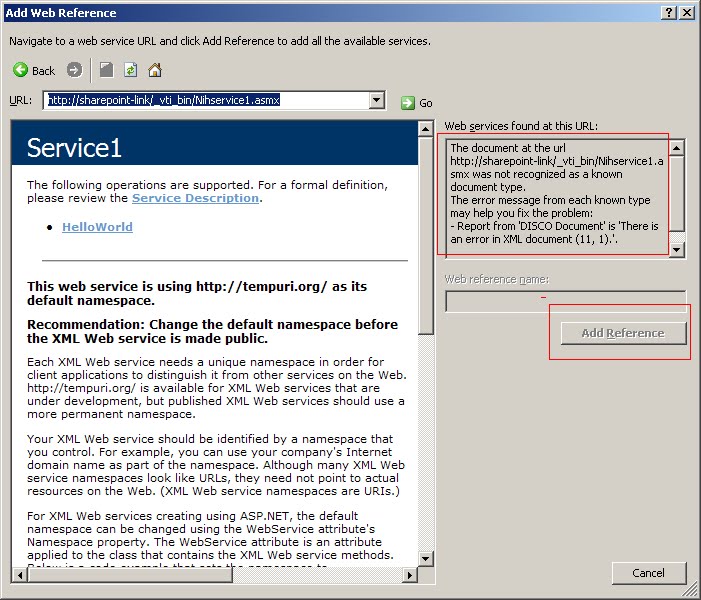
    This article gives all you need to create a custom web serice in SharePoint 2007. But when adding a custom service in Visual Studio 2008, get the following error:


    It turns out you have to append ?WSDL :


    A custom sharepoint web service needs to be put in _vti_bin to be trusted. Otherwise either SharePoint trust level or CAS policy need to be modified.

    Sep 23, 2009

    SPGridView Paging and Filtering

    A common issue with SPGridView is to enable paging: the PagerTemplate property of SPGridView needs to be set as null. If the SPGridView is declaratively defined in aspx page, the following code won't enable paging:

    <sharepoint:spgridview id="SPGridView1" runat="server" >
    <pagertemplate ></pagertemplate>
    </SharePoint:SPGridView>

    instead the following code works:

    protected override void OnLoad(EventArgs e)
    {
    SPGridView1.PagerTemplate = null;
    }

    After paging is enabled, another common issue is, filter is off after navigating pages. I know filter is off acturally on every subseqent postback, like sorting. But to some degrees, it makes senses to turn it off since users are given no indication that a filter is on otherwise, which can certainly cause some confusion. But turning filters off on paging is very unsatifactory.

    Inspired by the idea in this post, here is what I did to enable filtering across pages (based on .Net 3.5):

    first cache filter settings :

    protected override void OnPreRender(EventArgs e){


    ViewState["FilterExpression"] = ObjectDataSource1.FilterExpression;


    base.OnPreRender(e);


    }


    secondly, set filterexpression when postback is from pagings:


    protected override void CreateChildControls() {


    arg = (string)req.Form["__EVENTARGUMENT"];
    if (arg.StartsWith("Page$") && ViewState["FilterExpression"] != null)


    ObjectDataSource1.FilterExpression = ViewState["FilterExpression"].ToString();


    }


    related reference:


    http://geekswithblogs.net/mnf/archive/2005/11/04/59081.aspx (.Net 2.0)


    http://forums.asp.net/p/1067215/1067215.aspx (.Net 3.5)