Oct 20, 2010

Debug PowerPivot Errors

1) "Unknown Error" on Server Health:


This is a excel calculation service problem: its service account is not granted a db_owner role in Central Admin Content Database.


 See this post for explanation why this needs to be done.

2) Window Authentication Error:

This error occurs randomly after Excel Server reboot. It is because Claim to Window Token Service is not running, starting it from Service Management Console will make this error go away.


3) Red X Error in the bubble chart web part
check the version of Microsoft® SQL Server® 2008 R2 ADOMD.NET

notice: sometimes the version from control panel is misleading, so it is better to check physical file's version:
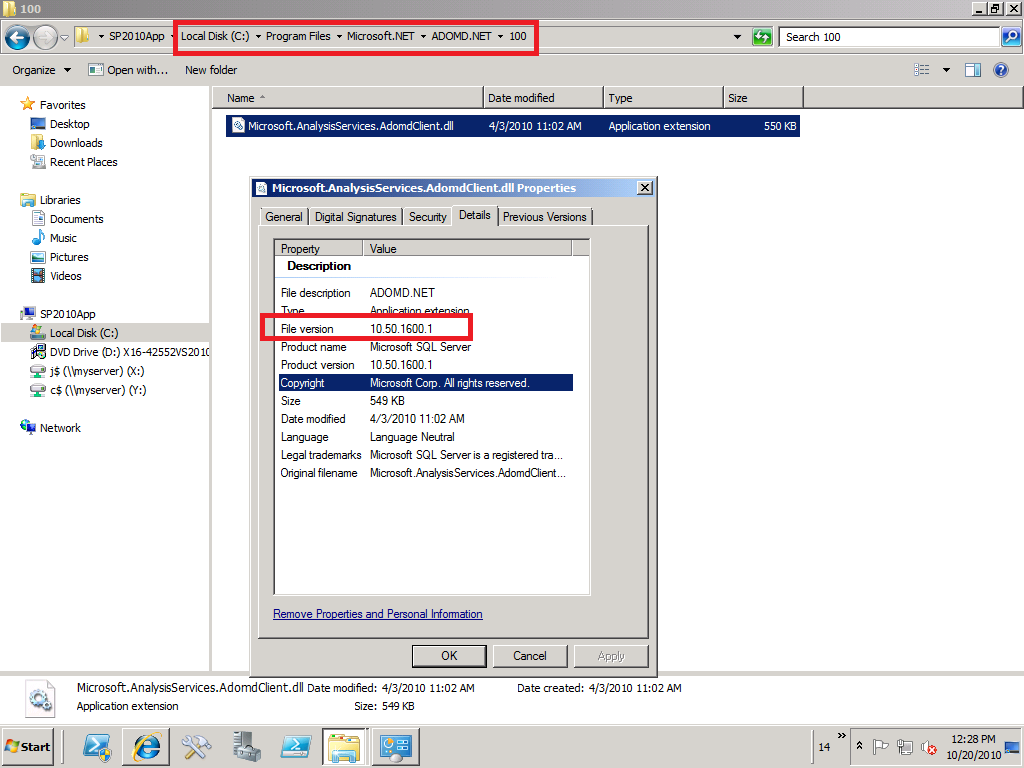

To get this version, download SQL 2008 R2 Feature Pack.

4) Red X error on PowerPivot Workbook in PowerPivot Gallery
Disabling loopback on the WFE should resolve this problem, this is best available fix so far. See this KB for details.

5) Window Event Log error on Orphan database associated with PowerPivot Application
This one happens if you created a powerpivot application and deleted it later. Even though the database was deleted, but somehow it still stays in sharepoint metadata. Use PowerShell get-spdatabase to verify and delete it.

6)PowerPivot Workbook Data Refresh "Access Denied" error
this one occurs when
  • Unattended Account is not granted "contributor" permission from sharepoint site, or
  • SSS application's owner is not set as Farm Account (don't know why....)


Data Refresh is triggered by Timer Job, which first fire request to SSS for unattended account credential, and on success, use the unattended account to open data source. In case datasource is sharepoint resource such as a integrated mode report, unattended account need sharepoint permissoin to do that. Notice, all those happen without PowerPivot service getting involved at all at this point.

7) Data Refresh Error when use SSRS report as datasource:
Errors in the high-level relational engine. The following exception occurred while the managed IDbCommand interface was being used: The remote server returned an error: (403) Forbidden..
This error occurs when powerpivot Analysis Service try to access embedded SSRS report data. This call is made directly to SSRS by PowerPivot Analysis Service. As SSRS needs to check sharepoint permission of caller credential (which credential? when kerberos is implemented, it is PowerPivot Analysis Service Account. see this post for details), it throws the above error when the PowerPivot AS service account doesn't have sharepoint read permission. Notice: in this case, it is PowerPivot Analysis Service Account that will be ultimately passed to SSRS reporting data, not unattended account.

PowerPivot Data Refresh and Excel Refresh

PowerPivot Workbook has 2 kinds of data sources, one is from its Pivot table cache, and the other is from PowerPivot Analysis Cubs. Then what  about Data Refresh? PowerPivot Data Refresh is to refresh Analysis Cubs from external data sources, and as part of this refresh process, the workbook is updated as well.

The credential used for data refresh can be: Unattended account, embedded window credential, or SSS


Notice, there is no window authentication listed above, which means the logon user credential is never used for data refresh. So obviously data in Analysis Service is not security trimmed.

Also notice, it is PowerPivot System Service which retrieves data refresh credential and then sends to Analysis Service, since both PowerPivot and Analysis Service are guaranteed running on the same server, Analysis Service can delegate this credential further to external datasource without need of kerberos delegation.

Not to confuse PowerPivot data refresh with Excel refresh. Excel refresh happens when users click slicer or manually do data refresh. The result is, its cached pivot table get refreshed from .abf file or AS cubs ultimately. PowerPivot functions as Excel data source in this case.

As both Excel Service and PowerPivot service are claim aware, it is claim token that flow from Excel to PowerPivot System service. From PowerPivot to Analysis Service which is not claim aware, it is window token that flows thanks to Claim to Window Token Service. But the most interesting thing is, PowerPivot use PowerPivot Service Application account, not logon user account to connect to Analysis Service:


This is why there is no need to configure security in PowerPivot Analysis Service, but the question is, what is the security enforcement at Analysis Service level even with the note "PowerPivot System Service immediately downgrade the connection"?

the answer is it doesn't need to be, since the data refresh is just to refresh data in AS cubs, and they don't need to be security trimmed. Excel Service will enforce security when it connects to AS Cubs to fetch data.

The follow-up question is, does Excel Service account need kerberos delegation to AS? The answer depends, if Excel Service and Power Pivot run on the same server as they should, there is no hop and Kerberos is not required, if Excel Service and Power Pivot run on different server, Excel Service account should be granted a delegation right to AS and logon users should have read access to AS Cubs if window authentication in Excel workbook is chosen.

Oct 10, 2010

Dilema: which account to run SPUserCodeV4?

If you want to run sandbox solution, you have to run "Microsoft SharePoint Foundation Sandboxed Code Service", which is a SharePoint service wrapper for window service "SharePoint 2010 User Code Host", and has no service application associated with it.


By default, this service is run under sharepoint farm account, and results in a warning from SharePoint Health Analyzer.

You can certainly change it to run as a different managed account to suppress the warning, but you should be aware of its ramification: the managed account running this sandbox service will be granted some privileges similar to farm account, such as  db_owner roles for all WSS Content databases! And this role won't be reversed on later service account changes. This certainly violate least privilege rule.

Oct 9, 2010

other service accounts' database right and sharepoint permission: issues related with Excel, PerformancePoint and People Search

As recommended by this technet article, running sharepoint 2010 portal application under one service account, and running all other service applications such as Excel, PPS etc under other application pool accounts, if so, does any service application pool account have access to the portal's Content Database? Does any of them even have permission to sharepoint portal site?

Quoted in the same technet article:
Other application pool accounts

The other application pool account must be a domain user account. This account must not be a member of the administrators group on any computer in the server farm.


The following machine-level permission is configured automatically: This account is a member of WSS_WPG.


The following SQL Server and database permissions are configured automatically:
This account is assigned to the db_owner role for the content databases.

This account is assigned to the db_owner role for search databases associated with the Web application.
This account must have read and write access to the associated service application database.
This account is assigned to the WSS_CONTENT_APPLICATION_POOLS role associated with the farm configuration database.
This account is assigned to the WSS_CONTENT_APPLICATION_POOLS role associated with the SharePoint_Admin content database
The one in red is questionable: actually none of application service accounts has been granted db_owner for Content Database! This is the root problem of "The workbook cannot be opened" Error as described in this blog.

The same problem occurs to Performance Point Service, but PPS even has another anomaly: its service account has to be granted a "read" permission for "Data Connections" as described in this blog. Somehow PPS invoke RunWithElevatedPrivilge call to check user's permission on "Data Connections" library, and get access denied error. The error tells us that those service accounts don't even have sharepoint portal access!

Search Service Account and default content Account(crawl account) are generally granted full read access in the web application's "user policy", but even so, it doesn't mean either of them has content database owner right. Also notice that default content account needs to have "Retrieve People Data for Search Crawlers" right on Profile Service Application in order to crawl people profile or sps3://mysite. If you change the default content account, this right needs to be update manually.

Oct 6, 2010

SharePoint 2010: The Security Token Service is not available

This problem has been reported mostly from SharePoint 2010 beta 2 due to the missing of Hotfix KB 976462. SharePoint 2010 RTM has this hotfix included in the prerequisite as you can see it from window updates off control panel. so don't bother to download and install again:


But occasionally this problem occurs even to RTM sharepoint 2010.  The sharepoint Health Analyzer report it only as warnings, but it is actually a fatal error as it results in failure of all claim aware services such as search service, for example: When a user start searching, WFE needs to talk to Search query componet, and if the Search query is hosted in a different server, WFE needs its local STS to collect claim, and then sends the claim to Search query component Server. Obviously unavailability of STS on WFE will break things totally.


What is the fix then? STS is neither a SharePoint service, nor a window service, but actually a WCF web service, so first to check IIS if this web service or its application pool is running, and if they are, try to restart and if that still does not solve the problem. You need to re-provision STS service application. The STS service application is provisioned during sharepont configuration, and is not clickable from UI:


But it can be re-provisioned from Powershell:
$sts = get-spserviceapplication -identity {id of sts}
$sts.status  
online
$sts.provision()

Additionally, disconnecting servers from farm and rejoining them can also fix this STS problem.

Oct 4, 2010

SharePoint authentication mode to Reporting Servivce

SharePoint can use either "window authentication" or "Trusted Accont" authentication mode to connect its report services (essentially a web service).


in case of window authentication, it is logon user's credential flowing to RS, which is easy to understand, but implement window authentication/kerberos is generally mis-considered as difficult. For that reason, "Trusted Account" is provided as another option.

In case of trusted account, it is credential of application pool id that is passed over to RS. As RS by default allow all users, the authentication is not a problem. The challenge is, RS needs to check if the current logon user has permission to access report (essential a sharepoint list item in document library). RS doesn't have logon user's credential as it has never been passed in, but it does have SPUser object which Sharepoint impersonate on behalf of logon user. RS can achieve permission checking by using sharePoint object model.

At this point, RS can determine if the logon user has access to reports, but not report data itself. The report data access is enforced by each report's datasource:

As "trusted account" mode doesn't pass the logon user credential, the  report's credential can't use "window authentication/integrated" as shown above. In other word, only "window authentication" mode can use report's credential as "window authentication/integrated".

Oct 1, 2010

Don't install Sql Reporting Service with its service account as a built-in account

When you plan to integrate SSRS 2008 R2 with SharePoint 2010, it is a common scenario that DBA install SSRS and Sharepoint administrator does the configuration for integrate mode. Often times DBA just let SSRS run under a built-in account such as LocalSystem or NetworkService, and let a poor sharepoint guy do the rest of work. In order to run SSRS in an integrated mode, the first thing to do is to change its service account to a domain account. Then here comes the problem: in the sharepoint central admin, when you try to configure "Reporting Service Integration", you get an error saying failure to connect to RS!

Don't doubt about your typing skills or about your memory of your password or anything else (of course you need to check network communication between your sharepoint server and RS server, such as firewall etc). The problem is: if you ever run SSRS under a built-in account, the RS is automatically configured to run in a Kerberos authentication, and it stays that way even after the service account is changed into a domain account. Kerberos works by default if the service is running under a built-in account, but it breaks when service is running under a domain account unless you register the SPN.

As now you know why it breaks,  the solution is simply, either manually change the authentication type to "RSWindowsNTLM" in reportserver.config. or register SPN to the domain service account. see this post for details.

Sep 24, 2010

Thoughts on Installing Sharepoint with least privileges

Lately I have followed the "least privileges" rule while deploying SharePoint 2010 for a MCS customer. Immediately after core installation followed by a creation of BI site, I decide to apply June CU update first before provisioning the User Profile Sync service application. Without any second thought, I just kept using the same setup account to install CU. The setup account has only dbcreator and securityAdmin roles, based on "least privileges" rule. The result is very "surprising": each server's status is hanging with "upgrade available", and CU is not applied as it is indicated by Sharepoint version.

What is wrong? the setup account unfortunately doesn't have any access to sharepoint content database under least privileges, but which account should be used then? A farm account certainly has all accesses to every sharepoint database, but again by least privilege rule, it is not supposed to be a local admin, otherwise you get warnings from Sharepoint Health Analyzer. Actually, the farm account, as a service account, might not even be given the right to log on locally. So what is the workaround? the answer to this dilemma: break the least privilege rule by giving setup account a SA server role in the database, and then re-run the configuration wizard to fix the problem.

Aug 11, 2010

some notes on BCS, ECT authentication mode and SSO

SharePoint Business Connectivity Service, just like Excel service, is to get external data source into sharepoint, but its logic authentication is quite different from Excel Services, and it doesn't use C2WTS:

External Content Types in SPD have 4 types of authentications for external data source :
  • User's Identity
  • BDC Identity
  • Impersonate Window Identity
  • Impersonate Custom Identity
User's Identity is to use logon window user's identity to connect to external data, which requires Kerberos implemented for both sharepoint and external data source (no configuration needed for BCS application)

BDC Identity is to use Sharepoint application pool id to connect to external data ( it was called revertToSelf). no security enforcement.

Both Impersonate Window Identity and Impersonate Custom Identity are to use SSO:


The difference between those two is, the first one requires SSO application using window account and the second one use sql account as shown below:
To use ECT object, users need an execute permission which can only be set from central admin:

Aug 2, 2010

SharePoint 2010 Excel Services and External Data Refresh

Excel Services Configurations

Two most important configurations in Excel Services Application are:
  • Trusted File Locations: the whole sharepoint farm is pre-configured as trusted location.
  • Trusted Data Connection Libraries: it is still required in sharepoint 2010 (folder name can not be skipped).


Workbook Data Connection Properties:

Data Connection properties include usage and definition. The usage is per workbook, its setting is not saved in the configuration file. The connection can either use sql authentication or window authentication. Another import property for each connection definition is "Excel Services Authentication", which will be addressed in another post.


Ways to Refresh Data:

manual refresh (data connection)       refresh on open or periodic:


Some Refresh Problems:

  • Table not refreshable, only pivot table and pivot chart can be refreshed from external data.
  • Browser (IE) can cache old connection string. Close IE before testing new connection. 

  • periodic refresh won;t happen after excel service session timeout:

Excel service create a session (memory/disk) for each workbook and release them after timeout. Periodic refresh can't happen without a  ongoing session.


References:

SharePoint 2010 Excel Services Authentication Mode

One of properties in any workbook's connection is called "Excel Services Authentication". Its default choice is "Windows Authentication"

As stated in its description, this mode is supposed to use logon user's credential to connect to external data source. However this happens only if kerberos and delegation are configured correctly for both SharePoint and Excel Services, if not, excel services connect to external data source anonymously, which nevertheless doesn;t necessarily mean the failure of Excel Services data accessing. Why? since it largely depends on the connection definition in  your connection file:

  • if sql authentication is used and sql account/password are available in the connection string, excel service can still fetch external data.That explains why excel services can work OOB without any kerberos configuration even if its authentication is set as "window authentication".
  • if window authention is used in the connection string, and external data is not allowed anonymous access, you will get access deny error
  • Alternatively SSO can be used such as ProjectServer sample connection all use SSS ID called "ProjectServerApplication"
  • the "None" option requries unattended service account setup. by default, Excel service application doesn't create unattended account for itself.

To use logon user's credential to access external data source by using Excel Service,  there are 3 subsystems involved: sharepoint, Excel Service, and external Data source.

 Normally for scenario like that, all of 3 subsystems are required to be kerberos enabled (registering SPNs) and both sharepoint and Excel Service should have delegation rights. However, SharePoinit 2010 Excel Service is claim aware, i.e, it is claim that will be used for communication, thus no kerberos or SPN for Excel service is needed, nor SharePoint WFE service account (application pool id) needs the delegate right to Excel Services.

It is C2WTS that will take initial client kerberos token to external data sources. In order for that to happen, the following 2 accounts need to have delegation right to external datasoure:
  • service account running Excel Services Application. Find the application pool id from IIS:
      Update: actually it is easier to find it from Central Admin.
  • service account running C2WTS (which is a window service), or, computer account where C2WTS is running if "local system" instead of a domain account is used to run C2WTS
when configuring delegation, make sure use constrained delegation and choose "Use any authentication protocol" as shown below:


OOB SharePoint 2010 use "local system" to run C2WTS, but it is considered as the best practices to replace with a domain account. That will need some extra configurations:
  • register a trivial SPN for this domain service account (to trigger "delegation" option)
  • add to local admin group (need to reboot server)
  • In local security policy (secpol.msc) under user rights assignment give the service account the following permissions: 
          1.  Act as part of the operating system
          2. Impersonate a client after authentication
          3. Log on as a service 
  •  add this domain account into c2wtshost.exe.config as "allowedCallers"
  • add this domain account as sharepoint managed account and change c2tws service account from sharepoint central administration site
  • re-start the C2WTS service. for details see this white paper

Jul 29, 2010

Performance Point Server in SharePoint 2007

The installation of PPS creates a site in IIS called PPSMonitoring which include webservice and preview sub directory. Webservice is called to connect datasource, and Preview is used to deploy and preview dashboards instead of having to deploy to sharepoint every time.

if you get the following error when working in Dashboard Designer:

"Unable to connect to the specified server. Make sure the address is correct"
or:

"the requested item cannot be found. Verify that it exists and that you have access permission"


That most likely means PPS Monitoring web service is not running (due to app pool id password expired in some cases). and also make sure the specific user has the read permission to web.config and other physical files or use "pass-through" option


PSMonitoringWebService App Pool id is used for Dashboard Designer to connect the datasource. PPSMonitoringPreview App pool id is used during preview dashboard, and Sharepoint application pool id is used to connect to datasource once dashboard is deployed on sharepoint site.

Those application pool ids need to have appropriate access to data source. They also need to have permissions to PPS Monitoring system database (BPMdeveloper role), but this role is normally granted during installation/configuration except for sharepoint application pool if it is different. see this for details. In case  application pool ids change, you need to manually add it to this BPMdeveloper role. Otherwise you will get "unable to connect data source" error.

Jul 9, 2010

IIS 7 Kernel Mode Authentication, Kerberos and DNS Alias (CNAME)

The main idea of IIS 7 Kernel Mode Authentication is to allow HTTP.sys to handle authentication, which means the computer account running HTTP.sys (not application pool account)  will be used during authentication negotiation (see this post for negotiation details).  If site URL is constructed from server name, kerberos will work automatically regardless of app pool account, since Host/servername is registered when servers join domain. If site URL is not constructed from server name, negotiation will choose NTLM unless SPN is registered correctly with the server computer account. If SPN is register by mistatke with any other account, the negotiation chooses Kerberos, but authentication can never go through.


This is a huge improvment over IIS 6.0 with its infamous 401.1 deny issue when site URL is constructed from NetBIOS and IIS pool account is a domain account. 

CNAME is generally considered not good for kerberos (particulary for IIS 6), since the kerberos client is  not to ask SPN with CNAME. For instance, if intranet.company.com is an alias to server1.company.com, the client is going to ask KDC for http/server1.company.com, not http/intranet.company.com. This doesn't necessarily mean CNAME will break kerberos: in case of kernel mode, CNAME actually make kerberos work without the need to registering any SPN (in contrast, if it is an "A" record in DNS, SPN, http/intranet.company.com, will have  to be registered to the server machine account)

Does this mean Kernel Mode is a silver bullet for kerberos? No, kernel mode won;t work for Load Balance situation with multiple WFEs: it is impossible to register the same SPN for more than 1 server machine account.

So for system designed to be multiple server farm such as SharePoint, Kernel Model has to be unchecked in order to configure Kerberos.

As best practice, for multiple server system, turning off Kernel Mode and then handling authentication the same way as IIS 6. For single server, don't truning Kernel Mode off (instead registering SPN correctly when needed to configure Kerberos). If site URL is server name, truning off Kernel Mode will result in authenticatin fail. See this http://support.microsoft.com/kb/871179 for details.

Note: even though Authentication works, it doesn't mean delegation work as well. computer account is NOT granted delegation right by default.


Even though the kernel mode in IIS as well as CNAME record in DNS make debugging kerberos very difficult, but the basic rules still stand:
  • if kerberos client won't be able to get the SPN either because SPN is not registered or is duplicated, the negotiation falls back to NTLM.
  • if Kerberos client can get the SPN, negotiation ends with Kerberos (see negotiation process here)
    • If the SPN is registered to a wrong account, A SPN must be registered to a correct account: either server computer account (in case of kernel mode) or application pool domain account. If it is registered to a different account, the kerberos authentication will fail, normally you get prompted indefinitely and can nerve get in.
    • If the SPN is registered to the right account, either server computer account (in case of kernel mode) or application pool domain account, authentication succeed then.

Jun 16, 2010

a misleading "Access Denied" error when joining a existing sharepoint farm

Lately I have tried to join a new Report Server to an existing sharepoint 2007 farm as it is required for SSRS in integrated mode, but the configuration wizard fails at the step 2, i,e, connecting to configuration database, and I got the following error from window event log:

Failed to connect to the configuration database.
An exception of type System.Security.SecurityException was thrown. Additional exception information: Access denied.
System.Security.SecurityException: Access denied.
at Microsoft.SharePoint.Administration.SPPersistedObject.Update()
at Microsoft.SharePoint.Administration.SPServer.Update()
at Microsoft.SharePoint.Administration.SPFarm.Join()

As the error message indicates, all my thoughts are on the database connection, for that, I first check if the sql server is ping-able, and then the permission on config database, and then whether window firewall is open etc... everything is fine, I can even create a new farm with the same sql server, but I could not join!

At last, i found i have it is caused by different sharepoint versions: one with April 2010 CU and the other is just SP2. This is nothing to do with database. After installing the CU, the error disappears, and join is successful. I hope this can save me or someone else several frustrating hours next time.

Jun 14, 2010

Create a persistent alias in PowerShell

Often times, I need to query sharepoint cmdlets as I am starting to use Powershell, normally i wrote something like this:

 get-command where {$_.name -like "get-sp*"}

It works, but would it be nice to have this defined as an alias as I need to run it very often. Sure you can do this by using set-alias cmdlet, but it won;t survive another session, in other words, after you close powershell, it is gone.

the workaround is to define a function or alias in profile:

  •  Open Powershell ISE from Programs>Accessories>PowerShell folder
  •  Run the following code from the immediate window in ISE to create a new profile for all users
if (!(test-path $profile.AllUsersAllHosts)) {new-item -type file -path $profile.AllUsersAllHosts-force}

  •  Run the following code to edit the new profile
           psEdit $profile.AllUsersAllHosts


  •  When profile1.ps1 opens, add the following code:
           function getspcmd { get-command where {$_.name -like "get-sp*"}}
  • save and exit ISE
  • relaunch ISE and type "getspcmd"

Jun 3, 2010

Logon restriction on service accounts

Lately I ran into the same problem several times, so I decide to blog this to save someone else a couple, if not more, frustrating hours.

The problem is, during sharepoint or sql server installation we need to enter several service account and their passwords, and even though I use those passwords many times without any problem, I keep getting an error saying "invalid password or username", or sql service (or any other window service) can't start with the password  I enter. Someone must change the password without letting anyone else know?!

Not really, generally for those service accounts, network or server guys like to impose a log on restriction:


make sure your new server is in the list! and check the spell (no typo. windows don't check that for you).

where is SSRS 2008 web service?

When you configure SSRS's web service URL in RS Configuration Manager:


Have you ever wondered where this web service is or tried to go to IIS and look for a virutal directory called ResportServer? I did, but could not find it of course. As the RS server is also a SharePoint WFE (in sharepoint integrate mode), could it be a Managed Path defined in the sharepoint? No, it is not either. Then how could this url be resolved?

The answer is,  this url is reserved in HTTY.sys, and SSRS 2008 is not using IIS any more, for more details see this post.

Why SSRS server need to have SharePoint installed?

It sounds odd at first that we need to install sharepoint on Report Server. The installation actually makes RS as one of SP WFEs even though it normally doesn't actually handle any sharepoint web requests (no AAM configuration for RS server)

The reason that SSRS need sharepoint is that RS extension use sharepoint object model to do security checking (see here for details), and SP OM can only be available on a sharepoint server.

The fact that SSRS use OM to check permission essentially makes it possible to use "Trusted Account" when configuring report server from SharePoint Central Admin:


With "Trusted Account" setting, you don't need to enable kerberos for either sharepoint site or RS web server. The downside however is, you won't be able to get a security trimmed reports. Data access is through either sql authentication or through a credential mapping.

Installation of SSRS 2008 add-in for Sharepoint 2007 is interrupted

SSRS add-in for Sharepoint need to be installed in every sharepoint server, but not required for RS server (even technically it is one of WFE). If you use SSRS 2008 R2, you need to install SSRS R2 add-in for SharePoint. At this time, this add-in is yet to RTM. SharePoint 2010 prerequisite installer will install the SSRS 2008 R2 Add-in for SharePoint 2010, so you don't need any extra install. this article is a must read on how to configure sharepoint 2010 SSRS integration.


When I working on a single server scenario, the installation is seamless, just click the .msi file. But when I scale the single server to a medium farm:

1 WFE
1 AS
1 RS
1 SQL

The installation was always interrupted and rolled back. The workaround documented in readme.htm, it requires a 2 steps command line. Weird but works.

what Sharepoint need to know about SSRS?

After SSRS provision a web service, all sharepoint need to know is its url as specified in this setting:


Like any web service, Equally important is how authentication is chosen (also shown above).

The interesting part is "Trusted Account" choice which makes service calls under user context without configuring kerberose. For this reason another setting, "grant database access", is a required configuration for SSRS. It essentially grant SSRS's service account a "full control" to all sharepoint web applications and some access to central administration ( as a proof, even though there is no place in UI where permission is specified for the SSRS service account, you can certainly log as this service account to any sharepoint site). Also this account is granted a "WSS Content Application Pool" permission to sharepoint Config db. The reason to grant those permission for RS service account is because SSRS web service will need to invoke sharePoint Object Model to check user permission in case of  "trusted account" authentication.

Sharepoint 2010 simplify the 2 settings in one place: