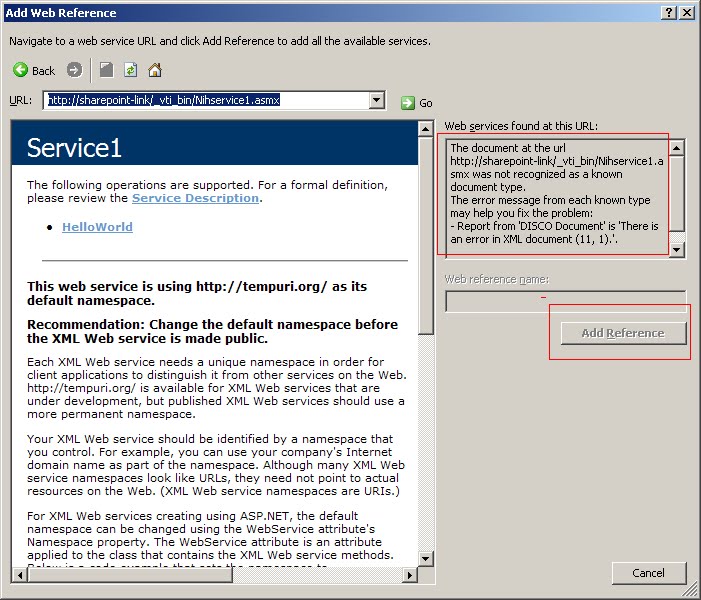
It turns out you have to append ?WSDL :
 A custom sharepoint web service needs to be put in _vti_bin to be trusted. Otherwise either SharePoint trust level or CAS policy need to be modified.
A custom sharepoint web service needs to be put in _vti_bin to be trusted. Otherwise either SharePoint trust level or CAS policy need to be modified.
A custom sharepoint web service needs to be put in _vti_bin to be trusted. Otherwise either SharePoint trust level or CAS policy need to be modified.


protected override void OnPreRender(EventArgs e){
ViewState["FilterExpression"] = ObjectDataSource1.FilterExpression;
base.OnPreRender(e);
}
secondly, set filterexpression when postback is from pagings:
protected override void CreateChildControls() {
arg = (string)req.Form["__EVENTARGUMENT"];
if (arg.StartsWith("Page$") && ViewState["FilterExpression"] != null)
ObjectDataSource1.FilterExpression = ViewState["FilterExpression"].ToString();
}
related reference:
http://geekswithblogs.net/mnf/archive/2005/11/04/59081.aspx (.Net 2.0)
Server Roles:
Understanding those and sharepoint application pool id (see this) can help to solve a lot sharepoint database permission issues such as :EXECUTE permission denied on object 'proc_putObject' in event log tells that the application pool id doesn't have write permission on configure database.
 5. Configure "incoming setting" in CA
Window Firewall only open Http at port 80. open an exception at CA port in App server to fix this problem.
Sharepoint SSP use web service call at port 56737. open exceptions on both WEF and App servers to fix this problem. If no query server is specified, configuration "looks like" it can go through, but "check service enabled in farm" disclose problems. Be sure to check it.
Sharepoint use SMB (File Shareing) protocol to push index from Index to Query server (WFE in this case). Open "File and Printer SharePoint" exception to fix this problem.
reference: http://blogs.msdn.com/joelo/archive/2007/02/13/protocols-ports-and-firewall-rules.aspx
 Secondly need to update wireless driver: no Window 2k8 wireless driver availabe, but I can use Vista's driver: the win2k8 installation process save all vista drivers in Windows.old folder. I use "Update Driver" option in Device Manager:
 3) enable RDP.
 since my server is From DHCP, DC vm need a static IP address and its DNS server should point to itself details


Notice the URL doesn't have to point to the WFE. for example, in the case of Load Balancer, URL points to LB, not WFE.
After authentication succeed, It is up to SharePoint to serve the http request. SharePoint provides content solely based on its AAM configuration, i.e, it must have that specfic FQDN configured (in the prvious example, it is sharepoint.company.com), otherwise, it errors out.
Notice in some scenario, IIS site which does authentication can have a different FQDN than that in SharePoint AAM.
 4. Choose "Convert Web Page to PDF.."
"The ... records center could not be found or accessed"
2) recommeded 3rd party adds-on:
3) customization:
However, most of above apply to sites in a same collection. There is very limited options when trying to sharing data cross site collections, which indicates to me anothe point: when designing sharepont taxonomy, data shareing is a very import factor behind sizing and security.


